Computer Network Outsourcing for Mid-size Companies
Microsoft Teams:
Design, Deployment, Troubleshooting
 Microsoft Teams operates on top of Office/Microsoft 365 and connects with a variety of cloud applications to deliver real-time conversation and collaboration. Developed as the replacement for Skype for Business Online, Teams offers a unified interface to support chat, audio/video conferencing with shared screens and white boards, IP calling, cloud voicemail, group mailboxes, plus file and app sharing. Microsoft Teams is seamlessly integrated with Microsoft 365 and relies on Microsoft Exchange and SharePoint Online, OneDrive for Business, and Microsoft Entra (formerly Azure AAD) for opening up its full set of capabilities. Your company can run Teams only or you can deploy a hybrid network model that combines Teams in conjunction with self-hosted Microsoft Skype for Business Server.
Progent's Microsoft Teams consultants can provide online and on-premises expertise to help companies of all sizes to understand the business advantages of Teams, design and implement an efficient upgrade to Teams from Skype for Business or Lync Server, and tune or troubleshoot a Teams environment. Progent can assist you to configure and manage a cloud-only communications system powered by Teams, and Progent's Skype for Business consulting experts can assist your company to integrate a hybrid solution that combines Microsoft Teams with your self-hosted Skype for Business Server ecosystem. Progent can help your company to combine Microsoft Teams with Exchange Online, SharePoint Online, and Microsoft 365 applications and also with your in-house PBX, your PSTN connection. gateway, and conference room telephony products.
Progent's Cisco CCIE network infrastructure specialists can assist your company to design and implement a robust network architecture for Teams, and Progent's information security consultants can help your business to define enterprise-wide communications security policies and rules following leading. Progent's consultants can help you resolve stubborn IT road blocks or deliver end-to-end project management or co-management services to ensure that your Microsoft Teams installation is carried out on schedule and within budget.
Key Capabilities of Microsoft Teams
Microsoft Teams combines messaging, conferencing, calling, document co-editing, app sharing, and file storage into a unified client interface. Microsoft Teams is continually updated and has reached or surpassed feature equivalence with Microsoft Skype for Business in all key functions. Teams also delivers significant improvements in scale, messaging, integration with Office/Microsoft 365, and other aspects of collaboration. In addition, Microsoft Teams brings the concepts of Teams and Channels to make it simpler to work together on initiatives, have real-time discussions, share documents and apps, and stage conferences.
Teams and Channels
Teams and channels are key structures in Microsoft Teams for enabling collaboration and sharing information. A team is a group of people from within and outside your company who can collaborate with one another in a positive way via meetings and by exchanging discussions, files, and apps. Teams can be based on departments, office locations, company initiatives, common interests, or anything else that can take advantage of a modern collaboration ecosystem. Whenever you define a team you create a Microsoft 365 group, a SharePoint Online web site and document library, an Exchange Online group mailbox and calendar, a OneNote team notebook, and a persistent chat-based workspace. If you make a team using a current Microsoft 365 group, that group's participants, SharePoint Online site, mailbox, and OneNote notebook are all added to Teams. A team can be public or private and can include up to 10,000 participants.
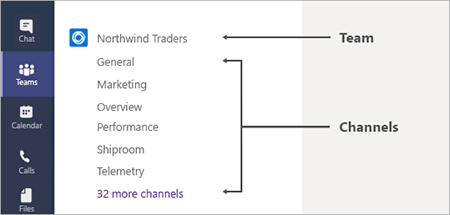
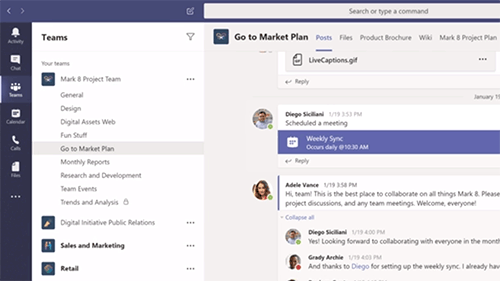
Channels are chat-based workspaces within a team. Each channel other than the default General channel is dedicated to a topic you specify. All conversations, file sharing, and meetings for a given theme take place inside the associated channel. Channels can be open to all team members or limited to a defined portion of the team. Permitted team participants can expand a channel by adding apps that include tabs, connectors, and bots. Files shared on a channel using the Files tab are hosted on SharePoint Online. Administrators can define policies to permit or reject apps for a channel. Conferences held within a channel can include digital whiteboards, notes, and messages. Integration with Microsoft Stream allows meetings to be recorded, stored, and replayed.
Integration with Office/Microsoft 365
The Microsoft Teams client interface operates in conjunction with Office/Microsoft 365 apps to deliver an extensible collaboration solution. Also, Microsoft Teams connectors make it possible for you to integrate Microsoft Teams with outside apps including Twitter, Facebook, YouTube, Google Analytics, Trello, and UPS Bot.
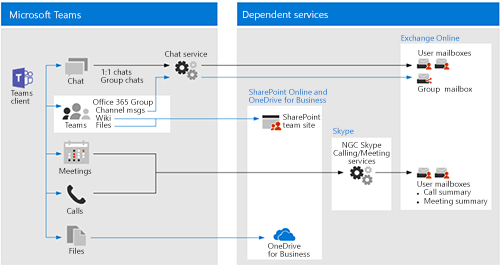
Samples of the integration of Teams with Office/Microsoft 365 include:
- Exchange Online and Outlook support group email and calendar services. You can set up and participate in meetings through either Outlook or Teams. Chat and channel messages are stored in Exchange for solid information security. You can also set up advanced security and data loss protection (DLP) for in-transit email and attachments.
- SharePoint Online support allows you to create discussion and news sites. Extensive options for managing permissions allow highly secure file sharing in the Azure cloud.
- Microsoft OneDrive for Business supports secure cloud storage of private documents or documents shared in Teams chat, synchronizes document revisions made when users are offline, and supports concurrent edits. Other storage services you can add to Teams channels include Dropbox, Box, ShareFile and Google Drive.
- Microsoft Entra ID (formerly Azure Active Directory) is leveraged by Teams to provide SSO with Office/Microsoft 365 apps, multi-factor authentication (MFA) for increased security, and conditional access rights based on group, geographic location, and device status.
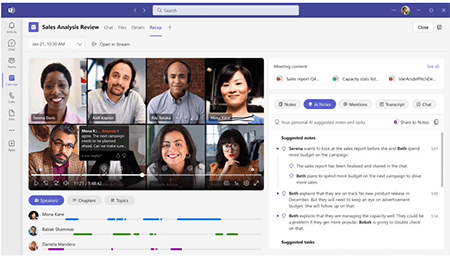
Teams Premium is an add-on product that enables Teams to be Teams more customized, intelligent, secure, manageable, and expandable. The rich features available with Teams Premium offer significant improvements to key areas addressed by Teams such as meetings, webinars, town halls, collaboration, protection, AI-powered meeting notes, and virtual appointments. To access Teams Premium, you must have a subscription to Microsoft 365 Teams plus a separate subscription to Teams Premium. Progent can help you to design, configure, and optimize your Teams Premium deployment so your organization can derive maximum value from this potent, AI-powered add-on.
Ways Progent Can Assist You to Migrate to Teams from Skype for Business or Lync
Teams takes the place of Skype for Business Online as Microsoft's flagship cloud service for unified collaboration. Organizations currently relying on Skype for Business or Lync should plan for the transition to Microsoft Teams.
Progent offers on-demand support for the wide range of IT disciplines required to maximize the ROI of your Microsoft Teams deployment. Progent offers the assistance of Skype for Business consulting experts and Lync Server experts to help you to stage your current system for upgrading to Teams. Progent's Exchange Online consultants, SharePoint Online consultants, and Microsoft 365 consultants can assist you to combine Teams with your favorite cloud apps. Progent's phone system infrastructure consulting experts can help your organization to integrate your phone system to Microsoft Teams.
Progent can provide remote or onsite consulting support to assist your organization to overcome occasional IT obstacles or Progent can deliver end-to-end project management outsourcing services to your organization to plan and implement a smooth upgrade to Microsoft Teams
Progent's expert services for assisting your business to upgrade to Microsoft Teams include:
- Assist you to determine your goals for your Microsoft Teams environment
- Inventory your current resources and call out any additional requirements for rolling out Teams
- Check that all users have correct licenses for Microsoft 365 services
- Provide guidance for selecting a collaboration architecture that uses Microsoft Teams exclusively or a hybrid model that combines Teams with on-premises Skype for Business Server
- Configure a supported session border controller with SIP trunking and PSTN lines to integrate your current phone infrastructure with Teams
- Check and revise current Dial Plans for running with Microsoft Teams
- Design connectivity and workflows for at-home workers and mobile users
- Create a governance strategy that complies with your company standards as well as regulatory requirements
- Plan and validate a cost-effective, phased upgrade procedure
- Set up an intermediate or permanent hybrid implementation that supports coexistence between Teams and on-premises Skype for Business Server
- Configure Microsoft Entra sync (formerly AAD sync), SharePoint and Exchange Online, and OneDrive for Business
- Upload data from a self-hosted SharePoint implementation
- Configure Microsoft Entra ID (formerly Azure Active Directory) Premium P1 and Active Directory Federation Services (ADFS)
- Configure Microsoft Entra Connect (formerly Azure AD Connect) with writeback for hybrid Exchange deployments
- Set up, install, and administer Office/Microsoft 365 services
- Deal with DNS and certificate issues
- Provide BYOD support by offering Apple iPhone and iPad management and Android phone and tablet integration services
- Deploy management tools such as Microsoft Teams Admin Center, Microsoft Entra (formerly Azure AD) Admin Center, and Office/Microsoft 365 Security and Compliance Center
- Configure the Teams Premium product to extend the capabilities of Microsoft 365 Teams
- Deliver group and individual online training
- Provide as needed consulting, development, and troubleshooting services
Contact Progent for Teams Consulting
To find out more about Progent's upgrade support for Teams, phone
Select Topic: