Network Help for Medium-size Companies
Microsoft Dynamics 365 Business Central
Migration, Configuration, Troubleshooting, and Guidance
 Microsoft Dynamics 365 Business Central, formerly called Microsoft Dynamics NAV and Navision, provides small and midsize businesses a comprehensive, unified solution for typical business activities including financials, inventory, operations control, project management, procurement, sales, supply chain management, and business reporting. Designed for the Microsoft cloud and powered by SQL Server, Microsoft Dynamics 365 Business Central supports tight integration with familiar Microsoft applications such as Office 365 Word, Excel, Exchange, Outlook, Power BI, Teams, Microsoft AI tools, and Azure Active Directory (AD). A range of Power BI-based modules such as Business Central Sales are offered on the Microsoft AppSource, and custom enhancements can be developed using Microsoft's Visual Studio Code tool. The ability to handle various currencies, exchange rates, and localized tax regulations enables D365 Business Central to work for multi-country companies.
The onsite edition of Dynamics 365 Business Central can be run at your data center and the SaaS release can be hosted by the Microsoft cloud or implemented in a hybrid cloud/on-premises model. Some features, like linking to Teams, are offered only for the cloud edition. The original Navision application that developed into Dynamics Business Central was initially released during the eighties as an international enterprise resource planning program. Progent's experts have worked with the Navision/NAV product line for years and can assist you to maintain legacy deployments or upgrade efficiently to the latest on-premises, cloud-based, or hybrid solutions. End users have access to the full functionality of Microsoft Dynamics Business Central from desktop, tablet, or handheld endpoints powered by Microsoft Windows, iOS, or Google Android.
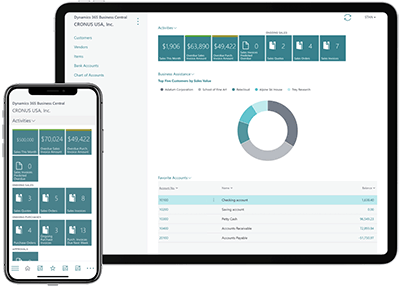
Features of Microsoft Dynamics 365 Business Central
Microsoft Dynamics Business Central includes within one platform the essential financial management functions needed by small and medium-size businesses and is particularly well suited for wholesalers companies and professional services organizations. Samples of functions include:
Financials
- Make and collect payments
- Bank reconciliation
- Fixed asset management
- Payment tolerances
- Month-end/year-end closing
- Account schedules
- AI-based cash flow projections
- Business mergers
- Month-end/year-end closing
- Planning for items to fulfil demand
- Post inventory transactions to G/L
- Work with item attributes
- Adjust Item Costs
- Transfers between locations
- Physical inventory recording
- Find serial or lot number in supply chain
- Item substitutions
- SKU-level cycle counting
- Track Items with Serial, Lot, and Package Numbers
- Reserve items
- Define job card
- Create job tasks and planning lines
- Job tracking
- Job and process costing
- Create time sheets
- Manage job budgets
- Monitor Job performance
- Track costs from materials
- Automatic physical or labor time inventory adjustments
- Defined purchase approval workflows
- Preview posting
- consolidated purchase receipts
- Posted purchase invoice corrections
- Electronic document conversion for invoices and credit memos
- Purchase line discounting
- Calculating with requested receipt date
- Merge duplicate records
- Prefilled email quote summary
- Relationship management
- Campaign management
- Applying prepayments
- Sales order/return order management
- Works with Microsoft Dynamics Sales
- Process cancellations
- Payment processing
- Calculate earliest ship dates
- Subscription sales
- Requisition Worksheet
- Demand projection
- Reorder point
- Rescheduling period
- Manufacturing policy
- Subcontract manufacturing
- Create production orders from sales orders
- Material Requirements Planning (MRP)
- Assembly and Manufacturing Management
- Set up codes for standard services
- Establish controls for Service Management Processes
- Service request control
- resource allocation and regions
- Repair status manageemnt
- Service contract templates
- Send and receive loaner items
Microsoft Dynamics Business Central supports close integration with Microsoft Office, Microsoft 365, and other Microsoft technologies to present a well-known and powerful work environment for users and developers. Progent's Microsoft Teams experts can assist your company to access your D365 Business Central data via the Teams PC, mobile device app, or web interface. This allows users to collaborate with colleagues, share information within Teams chats, locate key details about clients and vendors, and respond quickly to queries.
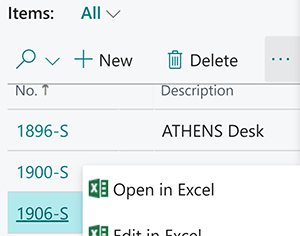
Progent's Microsoft Office and Microsoft 365 experts can assist your company to integrate the Microsoft Dynamics Office Add-in so you can utilize Excel to view Business Central data and initiate transactions, use Word to build templates that Dynamics Business Central can fill with real-time data, and use Microsoft Outlook for receiving quote requests and for generating and sending product quotes. Progent's consultants can also show you how to use Microsoft Outlook to detect new contacts and add them immediately to the Dynamics 365 database. In addition, Progent's developers can assist your development team to use Visual Studio Code to build custom applications for Microsoft Dynamics 365 Business Central.
Progent's app developers can provide Microsoft SQL Server consulting and Power Platform analytics mentoring to assist your company to utilize Microsoft Dynamics 365 Business Central to create applications and reports that make it easier for your employees to access and understand business data in a safe environment to guide business decisions.
How Progent Can Help Your Company with Dynamics Business Central
Beyond providing expertise for combining Dynamics Business Central with additional Microsoft products, Progent can assist your company to maintain legacy editions of Dynamics NAV or Navision or design and implement a migration to a current release. Progent's Cisco-certified CCIE network integration experts can help you to deploy and maintain a resilient and fast network infrastructure that supports on-premises, mobile, home-based, and cloud IT resources. Progent's certified IT security experts can help you to create a security plan that deploys AI technology to defend against ransomware and zero-day attacks and provides protection against inadvertent or intentional data leaks. Progent's disaster preparedness and business continuity consultants can assist you to document and test a disaster recovery plan that reduces downtime and data loss in case of a natural or human-caused disruption.
Contact Progent for Assistance with Microsoft Dynamics 365 Business Central
If your company is looking for an expert for Dynamics 365 Business Central ERP software, phone Progent at
Select Topic: