Network Help for Small Organizations
Windows 11 Upgrade and Integration Support
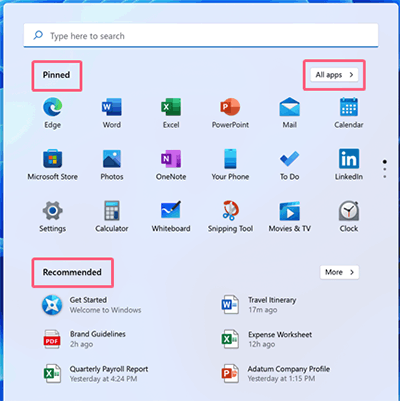
 Microsoft Windows 11 is more of a major update to Windows 10 and not a radically new operating system. Changes are concentrated on promoting efficiency by presenting the end user with a personalized interface with convenient access to commonly used apps and frequently referenced information. A signature innovation is the new Start menu, which allows you to pin and arrange icons for your favorite applications so you can quickly get on with the job.
Progent's Microsoft-certified consultants can help your organization to confirm the compatibility of Windows 11 powering your key workloads so you can evaluate the advantages to your company of migrating to Windows 11. Migration support offered by Progent online or on premises include ROI projections, pilot lab planning, hybrid cloud architecture, mobile access, security and compliance consulting, work-from-home solutions, management planning and automation, network design, Wi-Fi configuration, update management, business continuity planning, education for IT personnel and end users, Help Desk outsourcing, and ongoing technical support.
Progent stands out for being able to provide advanced expertise for Windows 11 on short notice. Progent can deliver as-needed help to resolve stubborn IT road blocks or comprehensive project management and co-management services to make sure you finish major Windows 11 projects on schedule and within budget.
New Features of Windows 11
Windows 11 modernizes its GUI across hardware platforms, permits greater desktop personalization, includes popular applications that previously had to be downloaded, offers native ability to run Android software, and revives access to Widgets for live data feeds.
New features to Windows 11 include:
- The updated Start Menu is the most prominent innovation of Microsoft Windows 11, taking the place of Windows 10's screen-hogging version with a compact, centered control panel that starts out populated with default application icons and can be easily customized to include the user's preferred set of programs.
- A personal version of Microsoft Teams is integrated into Windows 11 and can be launched from the taskbar. With this trimmed-down version of Teams, you can instantly phone, chat, text, or initiate a video/voice call with acquaintances in your contacts.
- Snap Layouts provide an advanced tool for organizing windows into selected zones inside predefined layouts on the Windows 11 desktop. Pausing on a window's maximize button shows a menu of available layouts. Clicking on a zone within a layout "snaps" the selected window into that zone. Snap Assist allows you to fill your chosen layout template with more windows. You can save your Snap Layouts in Snap Groups which can be accessed from the Windows 11 taskbar.
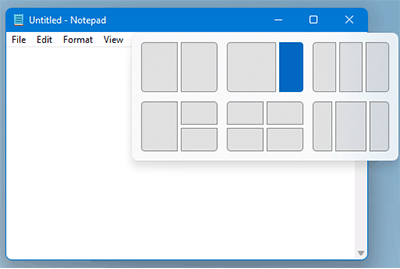
Snap Layouts permit you to arrange customized windows - The pre-installed Power Automate desktop workflow designer is a robotic process automation (RPA) utility that enables users to create workflows that can automate tedious manual desktop procedures. Power Automate lets you use pre-made or personalized workflows and can be used with common apps such as email, Excel, websites, files and folders. Microsoft's Power Automate is designed to replace older RPA platforms like Windows recorder (V1).
- Virtual Desktops allow you to build a variety of personalized desktops that each show apps associated with specific activities and workflows like accounting, sports, or investing. You can create virtual desktops and jump to them from the Task view icon on the Microsoft Windows 11 taskbar.
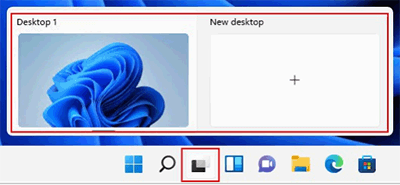
Virtual desktops in Windows 11 allow you to create custom desktops to facilitate distinct activities - Microsoft Windows 11 reintroduces Widgets, which concisely display real-time data delivered by selected sources. Widget information can consist of weather, traffic, entertainment, equity prices, To-Do tasks, and other dynamic data. Users can add|, delete, arrange, size, and personalize widgets based on their personal interests and work circumstances. Every user's newsfeeds are optimized automatically but users can select themes and sources.
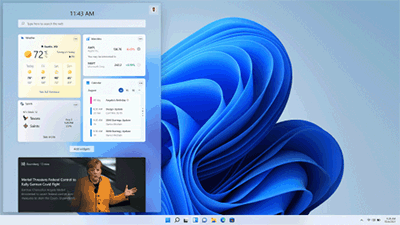
Widgets deliver realtime data on user-specified topics like weather, traffic, entertainment, and calendar - Android Apps work natively on Windows 11. The new Windows Subsystem for Android enables a Windows 11 PC to host mobile apps from the Amazon Appstore. These apps can use cellular data if your Windows 11 PC has a cellular connection and you subscribe to a data plan with a cellular service provider.
- TCP WAN performance for high-bandwidth networks is enhanced by the inclusion of the TCP HyStart++ and RACK-TLP algorithms in the Windows 11 transport protocol. HyStart++ reduces connection latency during start-up and RACK-TLP minimizes Retransmit TimeOuts.
Progent's Windows 11 Migration Services
Windows 11 will not run with outdated processors or ones that do not have Trusted Platform Module (TPM) v. 2.0. hardware. For in-place migrations to Windows 11, generation 2 VMs need to have two or more virtual processors, comply with host CPU requirements, and have virtual TPM activated. You cannot perform in-place upgrades of existing generation 1 VMs to Windows 11. For comjpliant PCs, you can install Windows 11 as an upgrade to Windows 10 via familiar tools such as Windows Autopilot, Microsoft Deployment Toolkit, and Configuration Manager. For devices running Windows 8, you first need to implement the no-cost update to Windows 10.
Since Windows 10 and Windows 11 can share a network, you can roll out Windows 11 using a phased approach. You can run the same utilities and follow the same workflows to administer both operating systems. You can monitor PCs, verify app compatibility, and automate Windows 11 deployments with the same software you use for Windows 10. This ability to build a consistent management solution simplifies Windows 11 upgrades. Progent can help you to design and implement a Windows 11 upgrade that maximizes the utilization of your existing network resources including desktops, software tools, applications, cloud-based and local services, and infrastructure.
Progent can provide these services to make sure you adhere to best practices for each stage of your Microsoft Windows 11 upgrade:
- Create an incremental rollout strategy that starts with developers and early adopters, moves to validation, and culminates in broad uptake
- Establish standards for readiness to advance to each consecutive rollout phase
- Inventory deployment utilities and verify your implementation strategy is supported by your network infrastructure, desired configuration standards, and security policies
- Define which applications will run as-is, which need updates, and which need to be replaced
- Design an ongoing PC management strategy
Progent's Other Consulting Services for Microsoft Windows 11
Progent can provide a range of outsourcing services designed to help organizations of all sizes to plan, implement, manage, and maintain hybrid networks that include desktops and laptops powered by Windows 11. Progent's Technical Response Center can act as a temporary and transparent extension of your in-house Help Desk to deliver online help from Microsoft-certified consultants to help handle the first surge of service requests you may experience as you migrate to Windows 11. Common questions may involve areas like application or driver compatibility, remote connectivity, or cybersecurity.
Progent's desktop management consultants and Windows 10 consultants can simplify the management of your Windows 11 endpoints by configuring time-saving tools for common tasks such as patch management services, keeping track of software licensing, checking utilization and performance, and guarding against cyber threats. Progent's mobile computing consultants can help you design a centrally managed BYOD environment for your smartphone and tablet clients by delivering services such as iPhone and iPad integration and Android integration consulting. Progent's Wi-Fi integration consultants can assist you to set up both fixed and temporary Wi-Fi networks for any venue including corporate campuses, branch offices, telecommuter environments, and conference sites.
Progent's certified network security consultants can help your business to plan, deploy, and test an IT security plan that marshals the modern security features of Windows 11. Progent has developed a variety of affordable cybersecurity assessment services to evaluate the security profile of PCs, notebooks, and tablets running Windows 11. For continual network threat defense and maximum uptime, Progent has developed the ProSight library of network management services which consists of a variety of round-the-clock online IT monitoring services such as Progent's ProSight LAN Watch server and endpoint management services and ProSight WAN Watch networkinfrastructure monitoring based on modern Remote Monitoring and Management (RMM) software. Progent's Cisco-certified CCIE network infrastructure specialists can assist you to benefit from the latest remote connectivity features of Windows 11 and can help you build a unified communications solution that supports a BYOD work style and delivers speed, modern cybersecurity, and high availability.
To improve manageability, security, economy, and availability for Windows 11 endpoints, Progent's Hyper-V virtual client experts can show you how to deploy the Client Hyper-V feature included with Windows 11.
Contact Progent to Find Out More About Planning and Migration Services for Microsoft Windows 11
To learn more about ways Progent's consultants can assist you to assess or upgrade to Windows 11, call
An index of content::
Progent's webinar training classes provide small companies the affordability, ease, and versatility of web-based learning and the proven training methods of seasoned teachers who utilize the latest technology to simulate live, interactive learning environments. Progent can provide online training for key desktop applications including elements of Microsoft Office such as Excel, Word, Access, and Project: MS Dynamics accounting and analytics software including MS Dynamics GP (Great Plains); plus other popular desktop applications like Photoshop, Acrobat Writer, and Crystal Reports.
Select Topic: