IT Network Help for Small and Midsize Businesses
ProSight Data Protection Services:
Hornetsecurity Altaro VM Backup Services
ProSight Data Protection Services - Hornetsecurity Altaro VM Backup
Hyper-V and VMware Virtual Server Backup/Recovery
 ProSight Hornetsecurity Altaro VM Backup is a fully managed service designed to provide small and middle-size organizations a reliable and affordable option for backing up and restoring Hyper-V and VMware-based virtual machines. Altaro VM Backup can be deployed local, remote, multi-location, and cloud network models and also offers cost-effective backup to a Microsoft Azure Block Blob storage service.
Top features of ProSight DPS Hornetsecurity Altaro VM Backup include advanced Augmented Inline Deduplication to reduce backup storage size, Continuous Data Protection (CDP) with backup intervals down to five minutes for reducing your vulnerability to data loss, military-grade data encryption, flexible recovery alternatives for entire virtual machines or for individual files, extensive integration with Cluster Shared Volumes (CSV) and VMware, and support for Microsoft Volume Shadow Copy Service technology to back up live VMs without disruption.
Progent is an Hornetsecurity Altaro partner and can provide a wide assortment of services to assist you to design, implement, test and troubleshoot a backup solution based on Hornetsecurity's VM Backup platform. Progent also offers ProSight Data Protection Services (DPS) Altaro VM Backup as a Backup-as-a-Service (BaaS) package to provide end-to-end monitoring and management of your backup/restore ecosystem. Progent's certified Hyper-V experts and VMware vCenter and vSphere integration experts can help your organization to plan and maintain VM environments that utilize on-premises or offsite virtual machines or that run in a hybrid architecture that incorporates both on-prem and cloud-based resources. In addition, Progent offers business continuity preparedness expertise to help businesses to rebound from catastrophic events such as ransomware attacks and widespread disasters.
Major Features of Hornetsecurity/Altaro VM Backup
Hornetsecurity/Altaro VM Backup is built to fulfill the backup/recover requirements of most small and medium-size organizations and offers ease of operation as well as a comprehensive range of capabilities usually available exclusively in enterprise-class platforms. Altaro VM Backup protects widely used releases of Windows Hyper-V and VMware vCenter and works with standard backup hardware:
| Hyper-V OS | VMware OS | Media |
|
Windows Server 2022 Windows Server 2019 Windows Server 2016 Windows Server 2012 R2 Windows Server 2012 Windows Server 2008 R2 Hyper-V Core Azure Stack HCI |
VMware vCenter V(5.0 and later) VMware vSphere V(6.5) VMware ESXi V(6.7 & 7.0) (Free ESXi not supported) |
USB Drives eSata Drives USB Flash Drives Network Shares NAS devices Desktop Internal HDs RDX Cartridges Altaro Offsite Server |
Altaro VM Backup comes with advanced features in critical facets of data protection such as backup replication, prompt restoration, and management and reporting.
Replication
Altaro VM Backup delivers rapid, efficient, and secure backup for data protection plus offsite replication for reliable recovery. Major backup and replication features include:
- Ransomware Protection via Immutable Cloud Storage: Immutable backup for cloud storage allows tamper-proof data for a set duration so that backup data cannot be modified or deleted by anyone including administrators. This adds another level of protection and restoration ability in case of a ransomware breach.
- Augmented In-Line Deduplication: Altaro's in-line variable block size deduplication sends only changed data to backup devices, conserving bandwidth, minimizing storage demands, and improving performance. Deduplication works with data on single VMs as well as on many VMs globally.
- Continuous Data Protection: Rather than performing daily backups, you can schedule backup intervals to as brief as five minutes to lower your Recovery Point Objective.
- Concurrent Backups: You can back up many virtual machines at the same time, which makes it possible to conduct backup operations during shorter off-hour time windows while more network bandwidth is available and network performance is less urgent.
- Live Backup: Altaro's integration with Microsoft Volume Shadow Copy Service permits you to back up VMs without requiring downtime.
- Cluster Shared Volumes and VMware vCenter: The ability to back up VMs running in a Windows Hyper-V Failover Cluster (with or without CSV) or within a VMware vCenter system allows larger implementations.
- Offsite Replication: To facilitate disaster recovery, you can deploy the Altaro Offsite Server utility on an external server for storing a copy of your backups at a remote location.
- Flexible Scheduling and Retention Policies: You can set different backup schedules and retention policies for individual VMs.
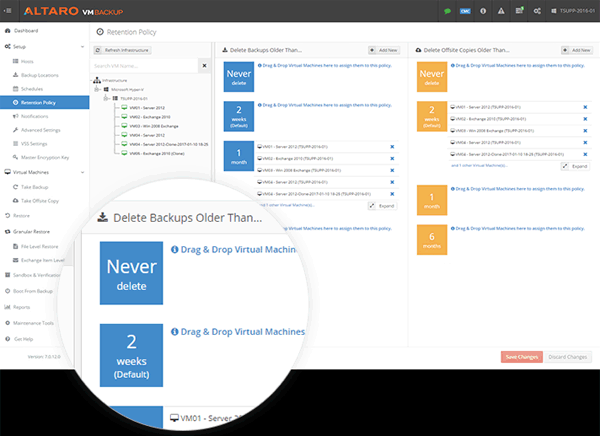
Scheduling and retention options for Altaro are easy to set up, review and revise - Workload Specific Backups: Altaro VM Backup can utilize Volume Shadow Copy Service (VSS) and all VSS Writers working inside the protected VM when executing a backup. Applications like Exchange and Microsoft SQL will sense the backup has happened and automatically proceed with the relevant maintenance tasks like truncating virtual log files.
- Military-Grade Encryption: Prior to saving your data to a backup destination, you have the option of encrypting it with the 256-Bit AES encryption standard.
- Virtual Disk Exclude: You have the ability to select which Virtual Disks to include or ignore in your VM backups.
- Grandfather-Father-Son Archiving: On top of your continuous and scheduled backups, you can set up a special backup schedule to create and archive a backup copy each week, month and year.
- Cloud Backup to Azure: Altaro VM Backup allows backup to an Azure Block Blob account, which is the least expensive storage option offered on the Azure cloud.
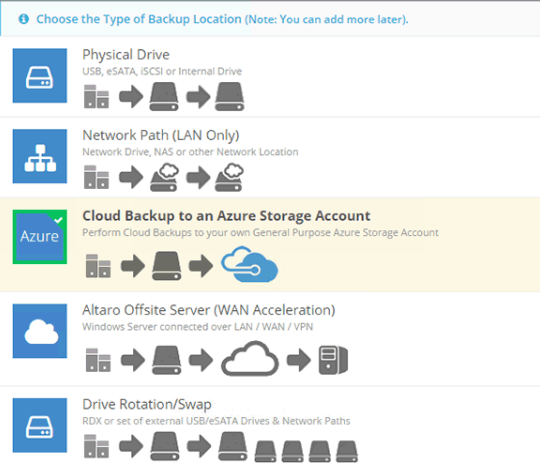
Altaro Virtual Machine Backup permits you to back up virtual machines hosted on-premises, offsite or in a public cloud - Cloud Backup to Amazon S3 and Wasabi: Altaro VM Backup VM Backup allows seamless backup to Amazon S3 and Wasabi clouds. No extra resources operating in the cloud are needed to provide storage for backup.
- Back up to multiple offsite datacenters: For better robustness, you can create copies of virtual machines on multiple off-premises sites including multiple public clouds like Microsoft Azure and Amazon S3.
Altaro VM Backup VM Backup offers a rich set of tools for granular point-in-time recovery of virtual machines and data files that have been backed up on schedule and need to be restored. In the event of a disaster, Altaro VM Backup has utilities for quickly recovering an entire site using the latest replicated version stored on a safe remote site.
- Recover as Clone: You can recover a virtual machine backup to a new destination with a new name, permitting the cloned VM to operate side by side with the original VM. This avoids the need to overwrite active VMs.
- Restore to Different Host: You can recover a VM backup to a different host. The VM can be restored from the on-prem backup location, or directly from the offsite copy location. (You cannot cross-recover between Windows Hyper-V and VMware Hypervisors.)
- Boot from Backup: You can instantly boot any virtual machine version directly from the backup location either for testing purposes or to create a significant improvement in Recovery Time Objective during a disaster recovery scenario.
- File-Level Restore: You can rapidly restore individual files from any VM backup.
- WAN-Optimized Replication: You can create ongoing copies of your virtual machines to a different site and transfer instantly to the copy location in case a disaster disables your primary virtual machines. This can dramatically reduce your Recovery Time Objective (RTO) and put you back online quickly.
- Exchange Item-Level Recovery: You can recover individual emails from the Exchange Mailbox database.
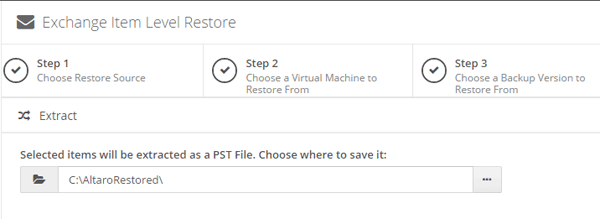
Altaro Virtual Machine Backup enables you to recover individual emails from an Exchange Mailbox - Restore Various Versions: You can restore from multiple periods instead of being restricted to the latest backup.
- Sandbox Restores and Testing: This feature lets you schedule or run manually test drills to assess the accuracy of your backup data. You can validate backup folders without connecting the virtual machine to your Hyper-V or VMware host, or you can execute a full test restore to a replicant and ensure that the recovered virtual machine can boot.
- Backup Health Monitor: Backup storage accuracy can be checked on demand and repaired automatically as part of the next backup operation.
The web-based Cloud Management Console (CMC) centralizes management, monitoring and reporting for Altaro Virtual Machine Backup deployments. The Cloud Management Console offers a single online portal for tasks such as initiating backups, setting up local and off-premises backup locations, defining encryption keys, and restoring virtual machines. The CMC also conserves time by permitting you to create specialized templates with schedules, retention details and other settings and assign them to multiple virtual machines across a selection of hosts. In addition, you can use the CMC to monitor backup activities in real time, view historic reports on jobs and problems, and configure the Cloud Management Console to send email alerts for completed or failed tasks and other important information.
Download ProSight Altaro VM Backup Services Datasheet
To view or download a datasheet describing the key features of ProSight Altaro VM Backup Services, click:
Progent's ProSight Altaro VM Backup Services Datasheet. (PDF - 310 KB)
How Progent Can Assist Your Business to Benefit from Hornetsecurity/Altaro VM Backup
Progent's Microsoft-certified Windows Server Hyper-V integration experts and VMware-certified vCenter consultants can help your organization to design, implement and manage a backup/restore solution based on Altaro VM Backup software. Progent's Exchange consultants can help your business to utilize Altaro VM Backup to protect your Exchange system, and Progent's Azure hybrid cloud integration experts can assist you to use your Azure Block Blob storage with Altaro to back up your virtual machines.
Progent's business continuity preparedness consultants can help your business to use Altaro's replication tools and offsite backup options to safeguard your critical data and enable you to resume your core services quickly in the event of a catastrophe.
Regular verification, testing, and optimization of system recovery are crucial and often overlooked requirements for successful disaster readiness. In case of a disaster such as a ransomware breach, these restoration drills can be the difference between a short loss of availability and a life-or-death threat to a business. Progent can help you to design a program for regularly validating, testing, and optimizing your restore procedures so you can keep your backup solution current and minimize the damage of a catastrophic event.
Progent's GIAC-certified information assurance specialists can evaluate the security posture of your backup solution and can help your business to implement advanced tools and adhere to industry best practices for operating securely in the current threat environment.
Contact Progent for Backup and Recovery ExpertiseFor expert help with backup/restore, ransomware protection, and disaster recovery, call Progent at
Select Topic: