Microsoft-certified Consultants
Exchange Server SE Expertise:
Design, Deployment, Support
Overview of Exchange SE
 Microsoft Exchange Server Subscription Edition (SE), originally branded Exchange Server 2019, is a self-hosted version of Exchange that supports hybrid deployments with Microsoft 365 Exchange Online. A headline feature is support for Windows Server 2019 Core, which reduces the target size vulnerable to a malware attack and eliminates unneeded services that waste CPU, RAM and storage. Improvements over Exchange Server 2016 include enhanced security and compliance, higher throughput and scale, and a multitude of new email client benefits.
The Mailbox and Edge Transport server roles plus management utilities for Microsoft Exchange Server SE need Windows Server 2019 Standard or Datacenter. Microsoft Exchange Server 2019 does not include the UM role, and therefore does not offer voicemail or auto attendant services. If your organization are upgrading from Microsoft Exchange Server 2013 or Exchange Server 2016 and have implemented Unified Messaging services, Microsoft advises that you move to the Microsoft Cloud Voicemail Service available in Microsoft 365. Skype for Business 2019 and Teams utilize this voice messaging service for Microsoft Exchange Server SE mailboxes. Essentially, migration to Microsoft Exchange SE can demand an all-out modernization effort.
Progent's Microsoft consultants can assist your organization with any phase of your upgrade to Exchange SE from Exchange Server 2016, Exchange Server 2013, or from other end-of-support (EOS) releases of Exchange Server. Progent can provide online and onsite guidance for system planning; configuring hybrid architectures; creating pilot systems; incorporating high availability technology such as hardware load balancing and database availability groups (DAGs); confirming licensing compliance; configuring host systems based on Windows Server 2019; planning and deploying Windows Hyper-V VMs; modernizing your voicemail system; and quantifying storage demands for virtual machines, critical databases and system logs. Progent's Exchange Server SE consultants are on call to deliver as-needed support to help your business take care of an occasional technical bottleneck or Progent can provide end-to-end project management expertise to ensure your Exchange Server SE migration is carried out on schedule and within budget.
Microsoft Exchange SE Architecture
Microsoft Exchange Server SE is engineered on the streamlined architecture used for Exchange Server 2016. This architecture combines transport services, mailbox databases, and user access services in the Mailbox server. This dramatically simplifies migration, deployment, scale, management, and troubleshooting in comparison to older versions of Exchange Server. The optional Edge Transport Server role comes with filtering agents that allow your perimeter network to control Internet-facing mail traffic and guard against information leaks, spam and malware.
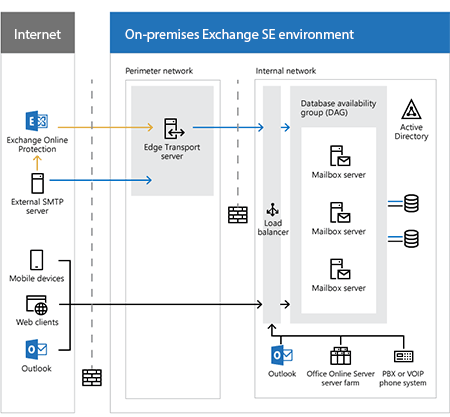
Exchange SE Mailbox and Edge Transport servers and management utilities need Standard or Datacenter version of Microsoft Windows Server 2019. To administer these servers from a Windows client requires a current 64-bit release of Windows. (Microsoft Exchange 2016 can be run on Windows Server 2012 R2 and managed with Windows 8.1 or later.) Progent offers online or onsite Microsoft Windows Server 2019 planning and integration expertise, Windows 11 system design and migration assistance, and Windows 10 integration expertise to assist your business to update your email environment.
Cybersecurity and Performance Improvements in Microsoft Exchange SE
Exchange Server SE is tuned for being hosted on Windows Server Core, which offers the most secure environment for Microsoft Exchange SE. You can also implement Exchange Server SE on Microsoft Windows Server 2019 with Desktop Experience, although this option exposes a larger target for malware attacks. Out of the box, Microsoft Exchange SE utilizes TLS 1.2 transport protocol and replaces legacy ciphers. Some standards organizations require the use of TLS 1.2. Another security improvement is the ability in Exchange SE to prevent outside users from connecting to the Exchange admin center (EAC) and the Exchange Management Shell command-line interface. This means you can require that the administration of Exchange Server SE may be performed only from within the security boundaries of your network.
For higher throughput and expandability, Microsoft Exchange SE can utilize as many as 48 processor cores (as opposed to 24 with Exchange Server 2016) and 256GB of RAM (as opposed to 192GB with Exchange 2016). Suggested minimum in-box RAM has been upped to 128GB. The well-tested search infrastructure used by Exchange Online has been ported to Microsoft Exchange Server SE to deliver improved search performance and faster database failovers, allow larger files for indexing, and simplify administration. Microsoft Exchange SE also allows bigger disk drives. To offset the increased latency characteristic of high-capacity spinning disk drives, the innovative MCDB technology of Microsoft Exchange Server SE enables you to configure solid state disk caching when you implement Database Availability Groups. Powered by features developed for cloud-hosted Microsoft Exchange Online, MetaCacheDatabase can dramatically enhance the responsiveness of the end user experience. Throughput is further increased by changes in Exchange Server SE algorithms that make more RAM available for caching live database copies. These enhancements in Microsoft Exchange SE make it practical to configure each server to accommodate more users, deploy bigger drives, and increase the responsiveness of common end-user operations.
Enhancements for Microsoft Exchange Server SE Clients
Microsoft Exchange Server SE supports Microsoft Outlook 2013, 2016 and 2019. Enhancements to the client experience include the Do-Not-Forward feature that allows only a conference's organizer to create invitations other guests. Out-of-Office options have also increased. Also, a new Remove-CalendarEvents cmdlet enables admins to remove calendar events organized by a worker who has left the business.
Cloud Voicemail for Exchange SE
Microsoft Exchange Server SE does not include the UM services offered in prior releases of Microsoft Exchange. UM services include voicemail and auto attendant. Skype for Business 2019 relies on Microsoft Cloud Voicemail Service for voice messaging functions for Microsoft Exchange Server SE mailboxes. (Skype for Business 2019 continues to support Exchange UM services for Exchange 2013 and Microsoft Exchange Server 2016.) Microsoft recommends that customers upgrading to Exchange Server SE adopt Skype for Business Server 2019 and use Microsoft Cloud Voicemail Service. Exchange Server SE and Skype for Business 2019 can be configured in a hybrid architecture with a mix of Microsoft Exchange SE and Exchange Online mailboxes so that both on-premises SE users and Exchange Online cloud clients have full access to the latest voice messaging services.
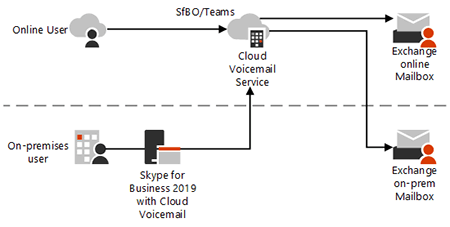
This voice messaging environment offers voicemail answering and deposit; voice-to-text and text-to-voice transcription; voice mail access through either Outlook or Skype for Business; voicemail administration through the M365 portal; and hybrid deployment support for Microsoft Exchange mailboxes on premises or cloud resident. Management is simplified because you have a single collection of management utilities for both Microsoft Exchange Server SE and Microsoft Exchange Online mailboxes. Progent can help you to follow leading practices to configure a hybrid topology that enables all your Exchange clients to access the Cloud Voicemail service.
How Progent Can Assist You to Deploy and Manage Exchange Server SE
Exchange Server 2003 has reached end of life (EOL). Microsoft Exchange 2007 and Exchange 2010 are all legacy products. Exchange SE, Windows Server 2019, Microsoft Skype for Business 2019, and SharePoint 2019 have all been revamped with Microsoft's proven cloud environment and tuned for hybrid deployments. Given this situation, it makes sense to think about updating your email and groupware infrastructure. Progent's Microsoft-certified consultants can assist you to assess the business advantages and integration hurdles associated with upgrading to Microsoft Exchange and other modern platforms; decide whether a self-hosted, cloud, or hybrid network model works best for your organization; design and document a deployment strategy that makes efficient use of your current resources; and perform out an upgrade from your existing Microsoft Exchange deployment to a modern messaging ecosystem powered by Exchange SE.
Progent's Microsoft-certified consultants can assist organizations of any size to follow leading practices for designing and carrying out an efficient upgrade to Exchange SE from Exchange 2016, Exchange 2013, Exchange 2010, Exchange 2007, or Exchange 2003. Progent offers a wide range of remote and onsite guidance such as project planning review; architecture documentation; setting up Microsoft Windows Server Core to host Microsoft Exchange SE; integrating Skype for Business 2019 and Microsoft Cloud Voicemail Service; preparing the schema, domain, and forest for Microsoft Exchange Server SE; designing and configuring Database Availability Groups (DAGs) and HLB for high availability and rapid recovery; setting up DirSync; updating firewalls, creating SSL certs and resolving SSL problems; setting up Internet Information Services; creating PowerShell scripts; and checking email flow.
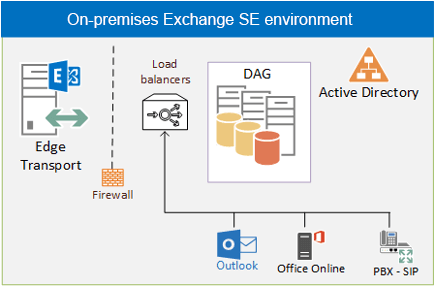
Progent's certified Windows Server consultants, Microsoft Skype for Business experts, Microsoft SharePoint 2019 development consultants and Microsoft 365 integration consultants can help your organization to create advanced, integrated collaboration solutions based on Microsoft Exchange Server SE. To enable mobility with Microsoft Exchange Server SE, Progent can provide Apple iOS integration expertise and Google Android smartphone expertise. Progent's load balancing consultants are skilled at designing and troubleshooting cost-effective technology from top vendors like Barracuda, Cisco, NetScaler, Coyote Point/Fortinet, and NGINX.
Progent's disaster recovery and business continuity (DR/BC) planning consultants can help your business to create, implement and test a disaster recovery/business continuity plan for Microsoft Exchange Server SE that uses multiple geo-dispersed IT facilities or a combination of physical and cloud resources. Progent's CISM and CRISC certified cybersecurity experts can create and enforce company-wide mail security policies that comply with corporate requirements and government mandates. Progent's Cisco CCIE-certified infrastructure engineers can help your business to plan, install and troubleshoot an affordable, protected, and resilient network infrastructure for your Exchange SE environment. Progent has more than two decades of background working with Microsoft's Exchange products and can help you adhere to industry best practices as you proceed through the critical stages of Exchange migration including Exchange version coexistence, pilot testing, mailbox migration, legacy technology retirement, debugging, training, and optimization.
Microsoft 365 Exchange Online Integration with Local Exchange
 Microsoft allows you to create seamless hybrid environments that combine Microsoft 365 and local Exchange deployments. This permits you to have specific mailboxes located on your corporate datacenter or private cloud and other mailboxes resident on Microsoft 365. Progent's certified Exchange consultants can help you with any facet of designing, integrating and debugging your hybrid Exchange solution. Progent's Exchange consultants can deliver occasional expertise to help you resolve challenging technical bottlenecks and also offer extensive project management outsourcing to make sure your hybrid Exchange solution is completed on time and on budget. For details about Progent's online consulting support for hybrid Microsoft 365 and on-prem Exchange environments, see Microsoft 365 integration solutions with on-prem Exchange.
Download Progent's Exchange SE Migration Support Datasheet
To download a datasheet on Progent's migration consulting services for Microsoft Exchange Server SE, click:
Progent's Microsoft Exchange Server SE Migration Support Datasheet. (PDF - 101 KB)
If you wish to get in touch with Progent about professional assistance for Microsoft Exchange Server integration, call
Select Topic: