Disaster Recovery/Business Continuity Support for
Microsoft Windows Server 2019 Failover Clusters:
Planning, Deployment, Management and Troubleshooting
 Microsoft Windows Server 2019 is the self-hosted release of Microsoft's server OS. Microsoft Windows Server 2019 incorporates all the updates for Windows Server 2016 formerly available exclusively via the Semi-Annual Channel (SAC). Windows Server 2019 offers important improvements in scale, throughput, manageability, security and compliance, application compatibility, Linux co-existence, container technology, and hybrid combinations of on-premises and cloud assets.
Headline enhancements of Microsoft Windows Server 2019 are Windows Admin Center for centralizing the management of hybrid local/cloud resources, System Insights for taking advantage of advance predictive intelligence to manage on-premises environments, Windows Defender ATP Exploit Guard for host-intrusion prevention, container orchestration using Kubernetes, Cluster Sets technology for creating and administering large non-stop scale-out clusters, and Microsoft's Storage Migration Service for streamlining the upgrade process from outdated editions of Windows Server.
Progent can assist your organization to configure Windows Server 2019 with current releases of Microsoft's popular apps by delivering expert services that include Microsoft Exchange Server consulting, Microsoft SQL Server 2019 integration consulting, SQL Server 2017 migration services, Microsoft SharePoint 2019 planning and integration, and Microsoft 365 hybrid integration expertise. Progent's consulting, troubleshooting and education services for Windows Server 2019 are available online and Progent also provides onsite consulting in metropolitan areas throughout the U.S. and Canada.
Hybrid Cloud Integration with Windows Server 2019
Microsoft Windows Server 2019 makes the Azure stack available to organizations of all sizes for building on-premises networks, private clouds, or hybrid architectures that combine on-prem IT assets with infrastructure and services provided via the cloud.
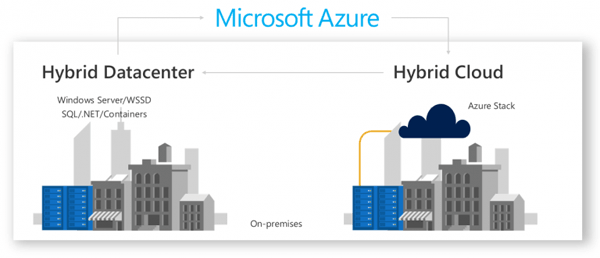
Many of modern companies deploy a mix of on-premises and cloud-based resources to deliver the right balance of control, economy, performance, availability, and security/compliance they require. For some fields, regulatory compliance demand that certain types of network resources and data be kept internally. In other cases, corporate standards or legacy applications necessitate line-of-business software to be hosted from a local data center. Microsoft Windows Server 2019 provides a cloud-friendly solution that allows you to build and manage productive hybrid ecosystems that seamlessly utilize resources spread across local facilities and the cloud.
Planning, creating and managing efficient hybrid solutions with Microsoft Windows Server 2019 demands a wide range of knowledge and experience. This is beyond the comfort zone of typical in-house IT groups in smaller businesses. Progent's roster of subject-matter experts (SMEs) offers as-needed access to the skills you need for any facet of hybrid network deployment and management. Progent's Microsoft-certified and Cisco-certified consulting experts, project managers, and cybersecurity professionals can assist you to assess the benefits of Windows Server 2019 for your company and build a hybrid environment powered by Windows Server 2019 that offers top business value.
A Good Time to Migrate
The release of Windows Server 2019 was accompanied by the notification of End-of-Support (EOS) status for Microsoft's popular Windows Server 2008 and Windows Server 2008 R2 platforms. The result is that there will be no more security patches onsite, no other enhancements, no free support options, and no online technical updates. Because of this, security will become increasingly difficult, maintenance costs and effort may increase, and system robustness may suffer.
If your business could use help upgrading to Microsoft Windows Server 2019 from WS 2008 or any other older release of Windows Server, Progent offers the knowledge and experience to make your migration efficient, economical, and fast. Progent can assist you to:
- Identify your applications and server roles on your existing servers
- Move your VMs to the Progent Cloud or move to the current release of on-premises Windows Server or to Microsoft Azure
- Optimize your configuration to minimize costs, manage assets, and strengthen data security across hybrid applications
Windows Server 2019 is offered in the affordable Standard edition and the high-end Datacenter version. The Datacenter version permits unlimited server virtualization whereas the Standard version allows two VMs. The Datacenter version also includes advanced features such as Shielded Virtual Machines, Network Controller, Host Guardian Service (HGS), Storage Replica, Software-defined Networking (SDN), and Storage Spaces Direct pooled storage. Many of these technologies are discussed in Windows Server 2016 consulting services.
Microsoft Windows Server 2019 has two installation alternatives: Server Core and Server with Desktop Experience. Server Core has a minimal footprint and has no traditional desktop interface but supports all role-based workloads. This "headless" mode needs to be managed remotely, e.g. with the command line or RSAT. The Server with Desktop Experience option is a full installation and includes a comprehensive GUI for local management. Progent's consultants can assist your business to determine the editions and installation options most appropriate for your situation, understand Microsoft's licensing rules, and choose an efficient on-premises, cloud, or hybrid network model.
Top New Features of Windows Server 2019
Microsoft Windows Server 2019 offers improved expandability, performance, manageability, virtualization, data security, hybrid networking, disaster recovery, container management, Linux compatibility, and other major enhancements. Editions of Microsoft Windows Server 2019 licensed under the Semi-Annual Channel (SAC) release model are updated two times annually, making new features available much sooner than under Microsoft's Long-Term Servicing Channel program.
Windows Server 2019 offers significant improvements in capacity vs. Microsoft Windows Server 2016:
| Capacity Limit | Windows Server 2016 | Windows Server 2019 |
| Max raw capacity per cluster | 1 PB | 4 PB |
| Max raw capacity per server | 100 TB | 400 TB |
| Max number of volumes | 32 | 64 |
| Max size per volume | 32 TB | 64 TB |
Additional notable improvements in Windows Server 2019 include:
- Cluster Sets is a technology that supports orders of magnitude expansion in cluster nodes in a Software Defined Data Center (SDDC) by combining multiple Failover Clusters into one large, uniformly controlled fabric. Network managers can seamlessly move virtual machines throughout the Cluster Set fabric and control all facets of a Failover Cluster from initial deployment to retirement. Clusters joined within a Cluster Set can take advantage of extra disk storage and memory in a separate cluster without requiring you to buy additional equipment. CPU and storage assets do not have to be the same, and resiliency matches or exceeds ordinary Failover Clusters.
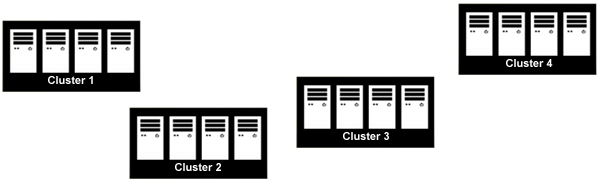
Before Microsoft Windows Server 2019, multiple Hyper-V clusters for VMs were a hassle to manage and modify 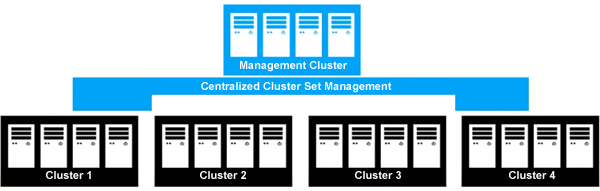
Windows Server 2019 introduces Cluster Sets for unified control of failover clusters - Storage Replica has been added to the Standard edition of Microsoft Windows Server 2019. Storage Replica provides next-generation disaster recovery support and is described in Microsoft Windows Server 2016 Storage Replica expertise. Novel features of Storage Replica in Windows Server 2019 include a test failover option that enables you to bring a destination volume online temporally for verification and backup. In addition, administrators can now manage Storage Replica with the new Microsoft Windows Admin Center, which provides a GUI tool for managing procedures such as server-to-server and stretch cluster replication.
- Storage Spaces Direct improvements include deduplication and compression for Resilient File System (ReFS) volumes, integrated support for storage-class persistent memory, support for using a commodity flash drive as a witness with dual-server clusters, greater expandability (as high as 4 PB per cluster), twice the performance for mirror-accelerated parity, outlier detection for abnormal disk latency, and the ability to increase fault tolerance by manually changing the limit of volume allocation. Windows Server's Storage Spaces Direct technology is described in Windows Storage Spaces Direct experts.
- Storage Migration Service streamlines the process of migrating storage from older servers to volumes in newer releases of Windows Server or Azure. You can deploy Storage Migration Service to move to new physical devices or to virtual machines. The utility inventories multiple servers and their data; relocates files, shares, and policy settings to their intended hosts; and allows destination servers to take over the identity of the source servers so that users and apps can have access to their data without changing anything. Windows Admin Center's graphical interface can manage many simultaneous migration processes.
- Expanded Linux support allows organizations to run Ubuntu, Red Hat Enterprise Linux, and SUSE Enterprise Server on shielded virtual machines. Shielded Virtual Machines technology is discussed in Windows Server 2016 Shielded Virtual Machines consulting.
- Windows Admin Center is a new browser-based application installed locally for managing servers, clusters, HCI infrastructure running Storage Spaces Direct, Windows 10 computers, and Azure-based VMs. Windows Admin Center can be utilized to manage Windows Server 2012 and later. Windows Admin Center is an "in-box" tool and therefore can be used to manage servers on private networks not connected to the public Internet. By posting the Windows Admin Center gateway server to the public Internet, you can manage your servers safely from anywhere.
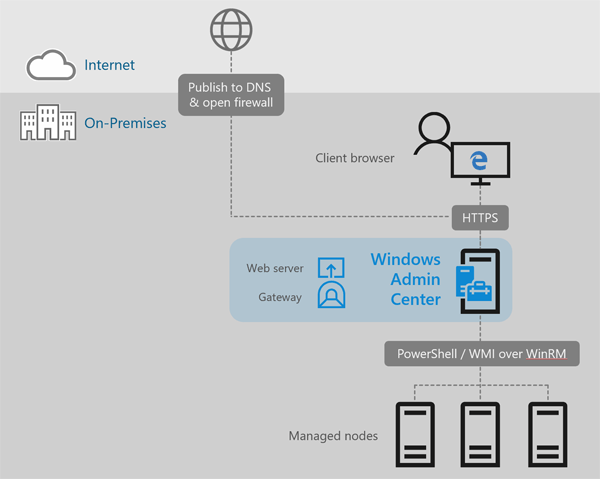
Microsoft Windows Admin Center permits you to manage local and Azure-hosted virtual machines from a single pane of glass - Container orchestration with Kubernetes, the popular open-source management system for Docker containers, includes improved capability such as the ability to use integrated network security to guard Windows and Linux services. For information about containers on Windows Server, see Microsoft Windows Server containers consulting.
- Deduplication and Compression for Resilient File System Volumes supports 10 times more data on a specified ReFS volume. The ReFS file technology, first released in Microsoft Windows Server 2012, integrates RAM-level performance tiers for handling hot data along with HDD/SDD capacity tiers to provide volume and fault tolerance.
- Windows Defender ATP is included with Microsoft Windows Server 2019 as an integrated feature requiring no special license and no agent software to install.
- Encrypted Networks is a new feature that encrypts data traveling between virtual machines communicating within subnets set to be Encryption Enabled. Datagram Transport Layer Security on the virtual subnet blocks entities with access to the physical network from reading, altering, or faking network data. Data traveling between encrypted subnets is unencrypted.
- A USB Flash Drive connected to your router can be assigned as a witness in dual-server clusters under Storage Spaces Direct. Using this economical, easy-to-configure technique, if a server fails and then recovers, the USB drive cluster can let you know which server has the more current data.

Windows Server 2019 allows a USB Flash drive to act as a witness in dual-server clusters - Low Extra Delay Background Transport (LEDBAT) automatically avoids network traffic jams by consuming bandwidth only when the network is being sparingly used. This enables an organization to send large, critical updates across a corporate network without impacting the responsiveness of business-critical services.
- System Insights uses predictive analytics and machine learning to simplify capacity planning. System Insights operates locally on every Microsoft Windows Server 2019 instance and looks at performance counters and events to forecast capacity needs in important areas such as utilization for volumes, storage capacity, CPU, and networking.
- Windows Time Service works with the modern time synchronization technique known as Precision Time Protocol and provides correct time during a leap second. Windows Server 2019 also supports software time-stamping and clock source stability. These capabilities provide improved accuracy and precision, comply with UTC and other standards such as Financial Industry Regulatory Authority (FINRA), and meet the requirements of special time-critical applications. Because network setup demands care to support the PTP protocol, Network Time Protocol (NTP) is still the default synchronization method for Windows Server 2019.
Progent's Microsoft-certified experts can help your organization to design and implement a cost-effective migration to Microsoft Windows Server 2019 using a local network model or a hybrid on-premises/cloud-hosted model. Progent can show you how to configure the new Storage Migration Service to trim off time and expense from the process of moving from outdated Microsoft Windows Server platforms as old as Windows Server 2003, and Progent's experts can help you to take advantage of new features of Windows Server 2019 to improve performance, expandability, uptime, and ease of management. Progent's Microsoft Exchange Server 2019 consultants can assist you to configure Exchange Server 2019 Mailbox and Edge Transport roles and management tools, which require Windows Server 2019. Progent's SQL Server 2019 consulting and development experts can assist you to integrate Microsoft's primary database engine with Windows Server 2019 to handle your vital applications in a leading-edge network environment.
Progent's certified cybersecurity experts can help you to follow leading practices to create an up-to-date information security solution that is consistent across on-premises and cloud-based assets and mobile devices. Progent can help your company to configure centralized data security monitoring using an effective mix of security tools and services from Microsoft and third-party vendors. Progent also can run security assessments to make sure that your IT environment meets government and industry data security requirements such as SOX, PCI DSS 3.2, and FedRAMP.
Progent's roster of Cisco-certified CCIE network infrastructure experts is one of the largest of any independent IT services firm in the U.S. Progent can assist your organization to design, configure and maintain a resilient and cost-effective hybrid network infrastructure that delivers the latest high-availability and disaster recovery technologies built into Microsoft Windows Server 2019. Progent's disaster recovery and business continuity planning experts can assist you plan and test a comprehensive solution for recovering rapidly from any anticipated disaster.
To assist your organization to support your Windows Server 2019 and Windows Hyper-V virtualized environment, Progent offers a range of services like Windows Admin Center deployment, PowerShell programming, SC Virtual Machine Manager hybrid on-prem/cloud management expertise, and System Center Operations Manager (SCOM) experts. Progent also offers the ProSight line of remote monitoring and management outsourcing packages that give small and mid-size businesses (SMBs) an economical and efficient option for network management.
Download the Datasheet for Progent's Windows Server 2019 Consulting Services
To see the datasheet describing Progent's expertise for Windows Server 2019, click:
Progent's consulting expertise for Microsoft Windows Server 2019. (PDF - 319 KB)
Progent's Remote Consulting Support and Troubleshooting Services
Progent has two decades of background delivering fast, high-level remote technical consulting and troubleshooting support and has delivered online support to businesses in every state in the US and across Canada. (View Progent's Customer Testimonials.) Progent also provides onsite support in most U.S. metropolitan areas. Progent offers as-needed support to help your business to resolve challenging technical issues or end-to-end project management outsourcing and co-sourcing support.
If you need immediate remote help from a Microsoft-certified consultant, visit Progent's Online Technical Support.
Contact Progent for Expertise with Windows Server 2019
To find out more about Progent's consulting support and troubleshooting services for Windows Server 2019, phone
Select Topic: