Disaster Recovery/Business Continuity Consulting Support for
Windows Server 2016 Failover Clusters:
Planning, Deployment, Management and Troubleshooting
 Windows Server 2016 Datacenter Edition includes significant enhancements to Failover Clustering, a key technology that supports disaster recovery (DR) and high availability by allowing you to combine multiple servers to form a fault-tolerant cluster on physical hardware or in virtual machines. A major enhancement is Storage Replica, Microsoft's first native solution for zero-data-loss disaster recovery, Storage Replica allows organizations to configure separate sites within a metro area to mirror data with crash-consistent volumes in order to ensure full data recovery in the event of a site outage. Windows Server 2016 includes a number of other important new and enhanced features for Failover Clusters, offering significant benefits in areas including availability and fault tolerance, Hyper-V virtualization, storage and infrastructure costs, ease of deployment, manageability, security, scale, performance, hybrid cloud support, health monitoring and audit reporting.
Windows Server 2016 is a cloud-tested platform that takes technology proven in Microsoft's vast Azure public cloud, including Azure's software-defined data plane, and makes it available for on premises deployments. As hybrid networks have become the norm, the migration of cloud technology to private data centers has made enterprise-class disaster recovery solutions practical for organizations of virtually any size.
Progent's team of disaster recovery consultants and certified Windows Server experts have the knowledge and experience to help you plan, deploy, test, maintain and troubleshoot a disaster recovery solution based on Windows Server 2016 that aligns with your business goals and IT budget. Progent's information assurance experts can help you prove compliance with regulatory requirements for disaster recovery, and Progent's business continuity consultants can help you integrate your disaster recovery strategy into a broader plan to keep your business operating at an acceptable level in the event of a predictable widespread catastrophe. By showing you practical and affordable ways to deploy Windows Server 2016 to improve your Recovery Point Objective (RPO) and Recovery Time Objective (RTO), Progent can help ensure that your investment in current disaster recovery and clustering technology adds maximum business value to your information network.
Windows Server 2016 Storage Replica
The headline disaster recovery feature of Windows Server 2016 is Storage Replica, Microsoft's first foray into zero-data-loss DR. Storage Replica allows you to mirror data between sites located within metro distances by using synchronous replication over a low-latency (5 ms or better round trip) TCP/IP or RDMA network using an SMB3 transport. If a protected site (also called a source or primary site) suffers a complete shutdown, you can switch quickly to the recovery site (also called destination or secondary site) without losing any data written to disk storage. Storage Replica can also be used for disaster avoidance, where users are seamlessly switched over to a recovery site in expectation of an imminent catastrophe such as a flood, wildfire or hurricane. For sites separated by longer distances or otherwise subject to higher latencies, Storage Replica supports an asynchronous replication mode that provides minimal data loss.
Storage Replica uses block-level replication between clusters or servers. This means that protected applications write data to at least two locations before the completion of any write operation. Because Storage Replica operates below the file level, it avoids the restrictions of technologies like DFS Replication, which requires that files be closed before replication and is subject to issues like files locks and open handles. Progent can help you upgrade from low-end disaster recovery solutions like DFS Replication to a zero-data-loss DR solution based on Windows Server 2016 Storage Replica.
For higher latency networks that span longer distances, Storage Replica supports asynchronous replication. Since Storage Replica asynchronous replication is continuous, not checkpoint based, the amount of data at risk of being lost is far lower than DR solutions based on snapshots. In addition, Storage Replica works at the partition layer, so it replicates all Volume Shadow Copy Service (VSS) snapshots, allowing application-consistent data snapshots for point-in-time recovery.
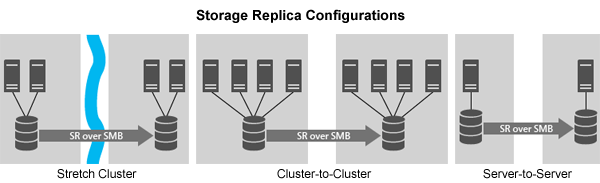
Topologies supported by Storage Replica include stretch clusters, cluster-to-cluster, and server-to-server. These configurations can run on physical hardware or VMs based on Hyper-V, VMware, Citrix XenServer, or other leading virtualization platforms. Stretch cluster configurations allow you to orchestrate and automate the failover process for workloads like Hyper-V private cloud clusters and SQL Server Failover Cluster Instance (FCI) and can be managed with Failover Cluster Manager. Storage Replica with stretched clusters can use Storage Spaces, SAN, iSCSI, and RAID through persistent reservation and can be run with two or more nodes.
The cluster-to-cluster configuration utilizes uses two distinct clusters and allows administrators to control the failover process manually. This topology is suited for environments where the secondary site set up solely for disaster recovery rather than as an active data center. With a cluster-to-cluster configuration, Storage Replica supports the cost-saving Storage Spaces feature of Windows Server 2016 and can be run with four or more nodes.
If your hardware does not support clustering, you can run Storage Replica in a server-to-server configuration. In this case the failover process must be performed manually. This can be a cost-effective DR solution between branch offices and data centers, and with asynchronous replication can support significantly better RPO than can be achieved with DFS Replication.
Progent can help you determine which Storage Replica topology makes the most sense for you business and can also help you plan, deploy, manage and troubleshoot your Storage Replica solution. For other zero-data-loss disaster recovery platforms supported by Progent, see VMware Site Recovery Manager consulting and NetApp MetroCluster disaster recovery consulting.
Additional Features of Windows Server 2016 for Failover Clustering
Important new and enhanced features of Windows Server 2016 include:
- Storage Spaces Direct allows you to pool low-cost commodity servers running Windows Server 2016 to create network attached failover storage clusters. The rotating and solid-state disks (SSDs) integrated with each server are automatically onboarded to the Failover Cluster by Storage Spaces Direct (S2D), and you can combine as many as 16 servers and 400 drives for up to 1 petabyte of storage per cluster. New servers can be added in minutes, and with Microsoft System Center require only a checkbox to install. The scale-out servers use their built-in Ethernet RDMA controllers and Microsoft's SMB3 transport to interconnect, eliminating the expense and management overhead associated with deploying a SAN solution with FC fabric.
When you create volumes from the storage pool, Storage Spaces Direct automatically generates a virtual disk and takes care of partitioning, formatting, and adding it to your Failover Cluster so it can be accessed by any node as a CSV. These shared volumes can tolerate drive, server, or component failures with uninterrupted availability, and you can replace failed hardware without downtime or complex management intervention. Performance can exceed 150,000 mixed random IOPS per server thanks to an integrated read/write cache and support for NVMe drives mounted directly on the PCIe bus. Storage Spaces Direct automatically utilizes the fastest storage available, such as SSDs, for its always-on cache.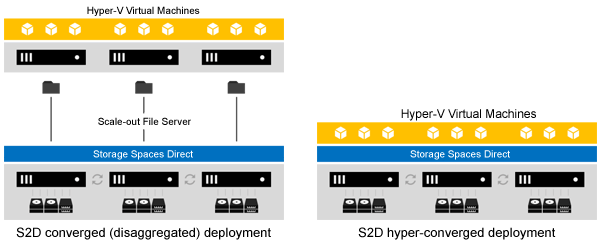
Hyper-converged deployments of Storage Spaces Direct are a good fit for SMBs or branch offices System Center 2016 Virtual Machine Manager supports two models for configuring and managing Storage Spaces Direct clusters. In a converged deployment, also called disaggregated, compute and storage resources run on different clusters. This provides administrators with the flexibility to scale compute resources independently from storage and is suitable for enterprises with larger environments and the skills to manage complex deployments. With a hyper-converged deployment model, Hyper-V compute and storage share the same cluster. This model, which minimizes hardware costs and is easier to configure and manage, is appropriate for smaller organizations or branch offices.
- Health Service is a feature introduced in Windows Server 2016 for monitoring the performance and capacity of Storage Spaces Direct clusters. Metrics reported by Health Service include IOPS, IO throughput and latency, physical (raw) storage and storage pool capacity, volume capacity, processor utilization, and memory. Health Service also continually monitors Storage Spaces Direct clusters and generates fault alerts ranked by severity and covering cluster and storage hardware, the Storage Spaces software stack, storage Quality of Service, and Storage Replica. For conciseness, fault alerts report root causes, such as a failed enclosure, rather than all the components affected by the failure.
Health Service can automate workflows in the disk retirement/replacement cycle by reporting a failed disk, copying data from the retired disk to the remaining disks to restore full resiliency, indicating a failed disk by blinking its disk or slot indicator light, verifying a replacement disk against a Supported Components Document, and substituting the replacement disk into the storage pool previously occupied by the retired disk.
- Cluster Operating System Rolling Upgrade is a new feature of Windows Server 2016 that allows the live migration of all virtual machines in a cluster from a Windows Server 2012 R2 host to Windows Server 2016 host. This lets you move Hyper-V and scale-out file server workloads to the latest version of Windows Server with zero interruption of service, avoiding downtime penalties against SLAs. Other cluster workloads like SQL Server are paused only for the few minutes required to failover to Windows Server 2016. The rolling upgrade process requires no extra hardware and the upgraded cluster continues using the existing cluster objects stored in Active Directory.
Cluster Operating System Rolling Upgrade utilizes a new mixed-OS mode that allows nodes with different host operating system versions to run within the same cluster. This allows you to pause, drain, evict, and reformat any node in the cluster, install Windows Server 2016 on the node, and bring the node back online. The Failover Cluster continues operating during this procedure as it would during any node outage. You can then use Failover Cluster Manager or PowerShell to add the upgraded node back into the cluster. All nodes operate at the older Windows Server 2012 R2 functional level until every node in the cluster has been upgraded. When all nodes have been migrated to Windows Server 2016, the entire cluster can be upgraded at once to the new functionality level with a single PowerShell cmdlet.
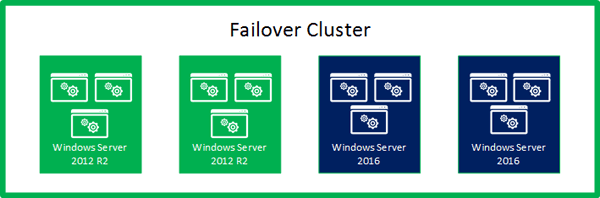
Rolling Upgrades allow you to stage a migration to Windows Server 2016 VMs without incurring cluster downtime Progent can guide you through the Cluster Operating System Rolling Upgrade process following best practices, help you load balance the upgraded cluster, and show you how to take advantage of the new features provided by Windows Server 2016.
- Fault Domains are hardware entities that share a single point of failure. Servers, or nodes, are the original fault domain supported by Windows Server Failover Clustering. Windows Server 2016 adds support for fault domains at the chassis, rack and site levels. Fault domain awareness improves fault tolerance by helping to distribute data across multiple vulnerable components so copies of protected data reside in different fault domains. Windows Server 2016 allows you to define fault domains with PowerShell or XML markup. Storage Spaces Direct uses fault domains to optimize data protection by automatically placing copies of data on different drives, nodes, chasses and racks. Windows Server 2016 Health Service uses fault domains to improve the usefulness of alerts. Stretch clustering uses fault domains for storage affinity, improving performance by running applications or VMs on servers in closest proximity to their storage servers.
- Virtual Machine Load Balancing is a new integrated feature of Windows Server 2016 that allows automatic live migration of virtual machines between nodes within a Failover Cluster. This helps maximize availability and performance of Failover Clusters and reduces the need to deploy additional physical servers to handle critical workloads during peak periods. VM Load Balancing improves performance, fault tolerance and resource utilization by automatically determining whether a node has become overloaded and assigning VMs from that node to an under-committed one, such as a server that has just been rebooted. This process requires no downtime, takes into account failure policies like fault domains, and is based on heuristics for weighing VM memory pressure, which is the most common resource constraint on a Hyper-V host, and CPU utilization of the node. VM Load Balancing can be configured to run every 30 minutes or on demand, and you can use PowerShell to select one of three thresholds for determining the aggressiveness of load balancing.
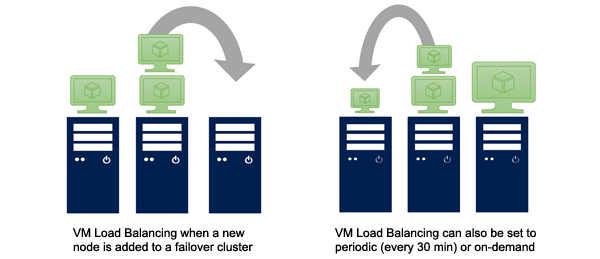
VM Load Balancing automatically and non-disruptively moves VMs from over-utilized to under-utilized nodes - Virtual Machine Start Order is a new feature in Windows Server 2016 Failover Clustering that allows you to orchestrate the priority in which VMs and all groups in a cluster are activated or re-activated. You can group VMs into tiers and define dependencies between different tiers. This can ensure, for example, that VM domain controllers are started first. This avoids scenarios where VMs that require services are activated before the VMs that deliver those services.
- Cloud Witness is a new type of quorum witness for Windows Server 2016 Failover Clusters that uses Microsoft Azure Blob Storage to maintain a blob file to act as the quorum arbitration point. The quorum witness has a vote in determining whether to keep a stretch cluster running after a datacenter experiences an outage and is an important component of an enterprise-class disaster recovery solution. Leveraging the Microsoft Azure cloud infrastructure is an easy and affordable way to host an offsite quorum witness without the cost and management overhead of deploying a separate datacenter. This also adheres to best practices when designing the topology of a quorum witness. You can use a single Azure Storage Account for multiple clusters, with one blob file required for each cluster. Since only a small amount of data is written to the blob file, which is updated only when the state of the cluster nodes change, the ongoing costs of the Azure storage account is low.
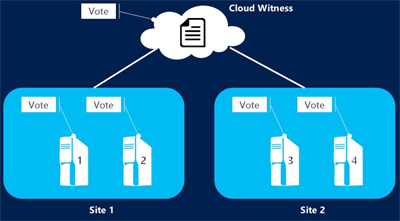
Azure-based Cloud Witness is a fast, affordable way to configure a Failover Cluster quorum witness - Support for Workgroup and Multi-domain Clusters makes it possible to create Windows Server 2016 Failover Clusters without Active Directory dependencies. In previous releases of Windows Server, Failover Clusters could only be created with server nodes joined to the same domain. Windows Server 2016 still lets you create single-domain clusters but you can also deploy Workgroup clusters and Multi-domain clusters with nodes that are members of different domains. You can use Failover Cluster Manager or PowerShell to create Workgroup clusters and Multi-domain clusters. The recommended witness type for Workgroup clusters and Multi-domain clusters is Disk Witness or the new Windows Server 2016 Cloud Witness. File Share Witness is unsupported for clusters with nodes that are not domain joined.
Progent's Microsoft-certified consulting team can help organizations of any size to design a non-disruptive migration to Windows Server 2016 based on the new Cluster Operating System Rolling Upgrade feature. Progent can help you configure Windows Server 2016 for one or multiple physical datacenters, for a cloud-centric deployment, or for a hybrid environment that seamlessly combines local and cloud resources. Progent's disaster recovery and business continuity consultants can help you design and validate a disaster recovery plan that incorporates Microsoft's latest high-availability technology for Failover Clusters including Storage Replica for zero-data-loss Recovery Point Objective (RPO), Storage Spaces Direct for enterprise-class network-attached storage using commodity hardware, Virtual Machine Load Balancing for improving the performance and fault-tolerance of Failover Clusters while minimizing capital investment and management overhead, and Cloud Witness for fast, low-cost deployment of a stretch cluster quorum witness.
Progent's information assurance consultants can help you achieve and prove compliance with regulatory and industry data security requirement such as SOX, ISO 27001, PCI DSS 3.2 and FedRAMP by showing you how to configure the powerful new security tools available with Windows Server 2016 including Windows Containers, Shielded Virtual Machines, Credential Guard, Remote Credential Guard and Just In Time (JIT) Privileged Access Management. (For a description of these security enhancements, see Windows Server 2016 integration consulting.)
Progent's information assurance consultants can help you deploy new security feature like Windows and Hyper-V Containers, Shielded Virtual Machines, Credential Guard, Remote Credential Guard and Just In Time (JIT) Privileged Access Management to make it easier for you to comply with regulatory and industry data security requirement such as SOX, ISO 27001, PCI DSS 3.2, and FedRAMP. Progent's roster of Cisco CCIE-certified network infrastructure consultants is one of the largest of any independent IT services firm in the U.S., and Progent can help you design, deploy and manage a hybrid network ecosystem that fully delivers the high-availability and disaster recovery capabilities of Windows Server 2016. To streamline the management of your Windows Server 2016 Failover Clusters, Progent can provide expertise with PowerShell scripting, Failover Cluster Manager, Hyper-V Manager, System Center 2016 migration, System Center 2016 Operations Manager (SCOM 2016) integration and Virtual Machine Manager 2016 (VVM 2016) hybrid cloud management consulting.
To help you protect critical Microsoft workloads with Windows Server 2016's disaster recovery solutions, Progent offers services that include Exchange 2016 integration consulting, SQL Server 2016 consulting, and SharePoint development and integration. For hybrid environments that use public cloud services, Progent offers Office 365 Exchange Online consulting, Amazon AWS integration, and Google Cloud integration consulting.
Progent's Online Consulting and Troubleshooting Expertise
Progent is a pioneer in delivering online consulting and troubleshooting expertise and has provided remote solutions to organizations in every state in the U.S. (See Progent's Customer Testimonials.) Progent also offers onsite consulting services in major metropolitan areas across the United States and parts of Canada. Progent can provide as-needed guidance to help you resolve occasional technical issues or full project management outsourcing or co-sourcing services to make sure your Windows Server 2016 initiative is successfully completed on time and within budget.
If you need immediate online help from a Progent consultant, visit Progent's Online Technical Response Center.
Contact Progent for Windows Server 2016 Expertise
For more information about Progent's consulting and troubleshooting support for Windows Server 2016, call
Zero-Downtime Technologies Supported by Progent's Consultants
Progent's Microsoft and Cisco engineers can help you to build an efficient, non-stop network that addresses key problems covering a broad range of networking technologies and processes including:
Business Continuity Planning
Progent's disaster recovery consultants can show you how to create a business continuity plan so you can resume network functionality in the event of an IT network disaster. Progent can help you to create a complete disaster recovery strategy that incorporates periodic disaster recovery evaluations and drills. Progent's Microsoft and Cisco-certified engineers can also show you how to create an affordable, high-availability network architecture that addresses reliability issues involving a broad array of network technologies and processes. To find out more, visit Business Continuity Consulting Services.
CRISC-Certified Network Risk Control
The CRISC certification program was initiated by ISACA to verify a consultant's ability to plan, deploy, and support IS control mechanisms to reduce network risk. Progent offers the expertise of a CRISC-certified consultant to assist your company to create and carry out a business continuity or disaster recovery plan that follows leading practices identified by CRISC and geared to align with your company's risk tolerance, business objectives, and IT budget. To learn more, visit CRISC-Premier IT risk management experts.
Microsoft Server 2019 Fault-tolerant Failover Clustering
Windows Server 2019 incorporated important enhancements in scale, performance, management, security and compliance, app compatibility, Linux co-existence, container technology, and hybrid combinations of local and cloud-hosted assets. Top new features of Microsoft Windows Server 2019 include Windows Admin Center for centralizing the management of hybrid on-premises/cloud deployments, System Insights for utilizing advance predictive intelligence to manage local networks, Windows Defender ATP (Advanced Threat Protection) Exploit Guard for host-intrusion defense, container orchestration using Kubernetes, Cluster Sets for deploying and administering massive high-availability scale-out clusters, and Microsoft's Storage Migration Service for streamlining the migration from outdated versions of Windows Server. For details, go to Microsoft Windows Server 2019 High Availability Failover Clustering Expertise.
VMware Site Recovery Manager (SRM) Disaster Recovery Solutions
VMware's Site Recovery Manager (SRM) is an extension to VMware vCenter that lets you specify, automate and test a consistent workflow for recovering applications and services rapidly after an outage. SRM supports centrally controlled and automated recovery, application mobility, plus non-intrusive site relocation, failback and site re-protect. SRM also enables transparent testing for disaster recovery, updates and patches and can generate reports to confirm complete service recovery, validate SLAs and prove DR compliance. Progent offers the support of a VCDX certified VMware SRM consultant to assist you to design, deploy, test and administer a DR solution powered by VMware SRM.
NetApp MetroCluster Disaster Recovery Platform
NetApp MetroCluster is a disaster recovery software suite that uses array-based storage clustering with synchronous replication to provide fast, zero data loss disaster recovery between datacenters that are as far as 185 miles (300km) away from one another. Progent can provide the skills of a NetApp MetroCluster expert who can assist your business to design, configure, administer, upgrade, test and repair a disaster recovery system built around NetApp MetroCluster. Progent can help you to select an architecture for your MetroCluster environment that meets your functional requirements and budget. Progent can ensure you adhere to best practices for configuring your MetroCluster environment by delivering help with procedures such as assigning disk pools and shelf IDs, determining plexes layout, provisioning NetApp FlexVol volumes, setting up NetApp Snapshot, provisioning switches, implementing a tiebreaker, setting up a TCP/IP configuration replication network between your storage clusters, and verifying your DR system to show adherence with industry standards and regulatory requirements.
Fault Tolerant Load Balancing
Progent provides fault tolerant load balancing consulting that addresses network load balancing, load balanced programs, network backbone routing, and content dispatching technology such as F5 Networks 3DNS. High availability load balancing solutions for which Progent offers consulting expertise include Microsoft Windows 2003 and 2008 Server Network Load Balancing Manager, Citrix Metaframe and Access Gateway, Cisco Content Services Switch, Cisco Content Engine and LocalDirector 400 series, and F5 Networks 3-DNS. For more information, see Fault Tolerant Load Balancing.
High-Availability Colocation
Progent's Data Center professionals can show you how to select zero-downtime data centers that match the particular needs of your business. Fault tolerant colocation sites are particularly appealing to small and mid-size companies due to of their affordability and simplified logistics compared to taking a do-it-yourself approach. Trying to build an in-house data center that offers even a minimum degree of fault tolerance is too expensive for most small businesses. Progent is ready to show you how to reap all the benefits of high-availability data centers by providing a full array of engineering and support services. For details, go to Fault Tolerant Data Centers Consulting.
High-Availability Inter-office Connectivity
Progent's inter-site connection professionals can help businesses create fault tolerant interoffice connections through fully redundant system architectures featuring automatic failover. Progent's Cisco-premier CCIE engineers can plan and implement ultra-reliable Inter-office connections supported by non-stop EIGRP routers or zero-downtime OSPF configurations of Cisco routers. Progent can demonstrate how multi-path connectivity and transparent fail-over can provide affordable 24x7 interoffice connectivity. To learn more, see High-Availability Inter-office Connectivity.
High Availability Internet Connections
Progent's Cisco-authorized IT engineers can show you how to build an economical, fault tolerant Internet connection solution that can deliver 24x7 Internet access via a wide array of high availability Internet network solutions including fault tolerant BGP, automatic fail-over, and redundant ISPs. Progent offers Cisco Certified Internetwork Expert engineers to help you utilize the most up-to-date techniques for fault tolerant Internet connectivity to create an economical, fully redundant Internet interface with automatic failover and other capabilities to create fault tolerant Internet connections. To read more, go to 24x7 Internet Connectivity Architecture.
Backup and Restore Solutions Consulting Experts
Progent offers affordable remote access to engineers with expertise in a wide range of products and technologies that provide solutions for protecting Windows, Mac, and Linux/UNIX servers and desktops plus laptops and smartphones. Progent offers consulting support for all major backup platforms such as Acronis, Backup Exec, BackupAssist, HP Data Protector, Double-Take, Mozy, Retrospect for Macintosh, Time Machine, VMware Data Recovery (VDR), and Solaris FLARs. Progent can assist you to implement, upgrade, or maintain backup/restore systems for a range of topologies such as local, edge to datacenter, cloud-based, or hybrid. To read more, see Backup and Recovery Solutions Consulting.
Microsoft System Center Data Protection Manager (SCDPM) Backup and Restore Consultants
Progent's expert Microsoft System Center Data Protection Manager consultants can help your company to create an effective business continuity strategy, design a cost-effective fault-tolerante IT architecture, install a System Center Data Protection Manager-based recovery system, comprehensively test your DPM system, train your administrative staff or local service providers how to manage Microsoft System Center Data Protection Manager, or provide extensive IT outsourcing services including off-site hosting of Microsoft SCDPM servers in Progent's secure data center. To find out more, go to System Center Data Protection Manager Consulting.
Barracuda Backup Local, Offsite and Cloud Backup and Disaster Recovery
Barracuda Backup is a low-cost, subscription backup and disaster recovery service for small and mid-size organizations. A Barracuda Backup solution can incorporate a purpose-built physical appliance built by Barracuda or a virtual appliance with comparable features but which utilizes your own storage infrastructure. Barracuda Backup protects vital business data generated on-premises, at one or multiple remote locations, or in the cloud. For disaster recovery, you can replicate data to the Barracuda Cloud, to Amazon AWS, or to any location with a physical or virtual Barracuda Backup appliance. Progent is a certified Barracuda partner and Progent's Barracuda Backup consultants can provide a broad array of consulting services to assist your business to design, integrate, manage and repair a backup and disaster recovery system based on Barracuda technology. For more information, visit Barracuda Backup and disaster recovery consulting and management.
ProSight Altaro VM Backup Software for Data Protection and Disaster Recovery
Hornetsecurity's Altaro VM Backup software provides small businesses a dependable and affordable platform for backing up and recovering Hyper-V and VMware-based virtual machines (VMs). Altaro VM Backup can be used for local, offsite, distributed, and cloud-hosted environments and also enables low-cost cloud backup to Azure Block Blob storage. Altaro VM Backup includes advanced features like Immutable Cloud Storage for an extra layer of recoverability from ransomware. Progent is a certified Hornetsecurity Altaro partner and can provide a broad range of remote or on-premises consulting services to assist you to plan, install, manage and debug a comprehensive backup and disaster recovery system powered by Altaro VM Backup. With ProSight DPS Altaro VM Backup, Progent delivers a fully managed backup/restore service powered by on Altaro VM Backup technology. To find out more, visit Altaro VM Backup certified consultants.
ProSight Data Protection Services 365 Total Backup Solutions for Microsoft 365
Microsoft 365 provides simple archiving but does not include integrated support for vital data protection services like Exchange Online backups or greater than 30-day point-in-time data recovery for OneDrive for Business or SharePoint Online. Hornetsecurity's 365 Total Backup delivers a feature-rich BDR solution for programmable backup and rapid restoration of all your company's M365 mailboxes, Teams Chats, SharePoint sites, OneDrive for Business files, and content on Windows endpoints. Progent is a certified Hornetsecurity/Altaro partner and has designed ProSight Data Protection Services (DPS) 365 Total Backup to provide end-to-end management services for Hornetsecurity's 365 Total Backup product. ProSight Data Protection Services 365 Total Backup provides a budget-friendly backup-as-a-service (BaaS) alternative that defends M365 components against data loss caused by human or software mistakes, malevolent deletion, and malware attacks like ransomware. To read more, go to ProSight Data Protection Services 365 Total Backup services for Microsoft 365.
Managed Cloud Backup: ProSight Data Protection Services ECHO
ProSight Data Protection Services ECHO offer small and mid-sized businesses an affordable and fully managed solution for secure backup/disaster recovery (BDR). Available at a low monthly cost, ProSight DPS ECHO automates and monitors your backup activities and allow fast recovery of vital files, applications and VMs that have become unavailable or corrupted as a result of component failures, software bugs, natural disasters, human mistakes, or malicious attacks such as ransomware. ProSight DPS ECHO can help you protect, retrieve and restore files, folders, applications, system images, plus Microsoft Hyper-V and VMware images. Important data can be protected on the cloud, to a local storage device, or to both. Progent's backup and recovery consultants can provide advanced support to set up ProSight Data Protection Services ECHO to to comply with regulatory requirements such as HIPAA, FIRPA, PCI and Safe Harbor and, when necessary, can help you to recover your business-critical data. Learn more about ProSight Data Protection Services ECHO managed cloud backup.
ProSight MSP360 Backup Services
Progent's data protection experts can assist you to create, implement and debug a backup/restore plan built around MSP360 software. MSP360 enables file or image-based backup/restore for virtual machines and physical computers, works with all leading public clouds, and allows you to create a data protection solution with a minimum Recovery Time Objective (RTO) and a granular Recovery Point Objective. With ProSight MSP360 Backup, Progent offers comprehensive monitoring and management of your backup system to prevent data loss caused by human mistakes, computer errors, malicious insiders, and malware attacks like ransomware. To find out more, see ProSight MSP360 Backup services.
Consulting for Double-Take Software for Data Backup/Restore
Double-Take Software offers a selection of products intended to deliver small and midsize businesses a variety of affordable solutions for backing up and recovering business-critical workloads including Microsoft Exchange Server, SQL, Blackberry, and Microsoft Office SharePoint. Progent's business continuity planning consultants have in-depth experience incorporating Double-Take Software products into small company IT systems to achieve a high state of fault tolerance and business continuity capability at a budget-friendly price. To read more, visit Consulting Services Double-Take Solutions for Data Backup.
Why Pick Progent for Disaster Recovery/Business Continuity Planning Solutions?
Since Progent is a Microsoft Certified AI Cloud Partner and provides specialized application consulting for a broad range of small business software programs, Progent is able to assist clients to arrive at comprehensive IT solutions that optimize the business value of your network. As a Registered Partner for Cisco, Progent can provide the expertise of premier engineers and specialists with expertise in architecting, installing and maintaining infrastructure environments based on Cisco products. The depth and breadth of Progent's IT know-how and Progent's familiarity with the needs of small and midsize businesses make Progent the ideal resource for creating and maintaining an affordable, fault-tolerant network.
To contact Progent about engineering support for non-stop infrastructure, call
Select Topic: