PC Desktop Consulting and Support Expertise
Microsoft Windows 11 Migration and Integration Support
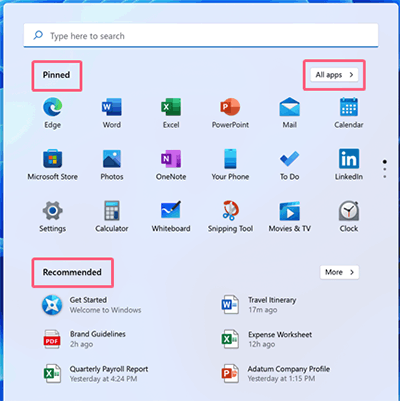
 Microsoft's Windows 11 is more of a major update to Windows 10 rather than a radically new client operating system. Changes focus on enhancing productivity by providing the user with an easy-to-customize environment with convenient access to commonly used applications and commonly referenced information. A signature example is the redesigned Start menu, which allows you to pin and arrange icons for your favorite applications so you can quickly get down to business.
Progent's Microsoft-certified consultants can help you verify the compatibility and performance of Windows 11 running your key applications and services so you can assess the benefits to your business of migrating to Windows 11. Migration services offered online or onsite by Progent include ROI analysis, pilot system design, hybrid cloud integration, mobile connectivity, security and compliance consulting, work-from-home solutions, deployment and management planning and automation, network infrastructure design, Wi-Fi setup, patch management, disaster recovery planning, training for IT staff and end users, and post-migration technical support.
Progent stands out for the ability to provide advanced guidance for Windows 11 on short notice. Progent can deliver occasional as-needed expertise to help you through stubborn technical road blocks or comprehensive project management and co-management services to help you complete major Windows 11 initiatives on schedule and within budget.
New and Enhanced Features of Windows 11
Windows 11 modernizes its user interface across hardware platforms, allows extensive desktop customization, integrates popular apps that previously had to be downloaded, offers native support for Android apps, and provides access to Widgets for real-time information feeds.
Enhancements to Windows 11 include:
- The revamped Start Menu is the most prominent new feature of Windows 11, replacing the earlier space-hungry version with a compact, center-stage control panel that comes populated with default apps and can be easily customized to include the user's favorite programs.
- A personal version of Microsoft Teams is integrated into Windows 11 and is accessible from the taskbar. With this trimmed-down version of Teams, you can immediately call, chat, text, or launch a video or voice call with people in your contacts list.
- Snap Layouts provide an advanced tool for arranging windows into selected zones within predefined layouts on the Windows 11 desktop. Hovering over a window's maximize button displays a menu of available layouts. Clicking on a zone in a layout "snaps" the selected window into that zone. Snap Assist lets you populate your selected layout with additional windows. You can save completed Snap Layouts in Snap Groups accessible from the taskbar.
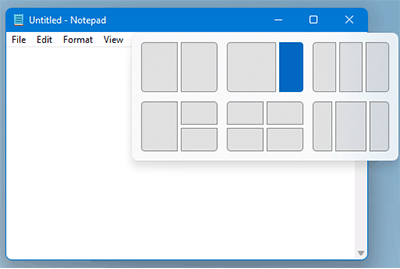
Snap Layouts in Windows 11 allow you to display groups of open windows in predefined arrangements - The pre-installed Power Automate desktop flow designer is a robotic process automation (RPA) tool that allows non-experts to record time-saving workflows that can automate all repetitive desktop processes. Power Automate allows you to use built-in or custom processes and can interact with common applications including email, Excel, websites, files, and folders. Power Automate is intended to replace older automation tools like Windows recorder (V1) and Selenium IDE.
- Virtual Desktops allow you to create multiple custom desktops that each display applications associated with specific activities and workflows such as accounting, entertainment, or investing. You can create virtual desktops and switch between them from the Task view icon on the Windows 11 taskbar.
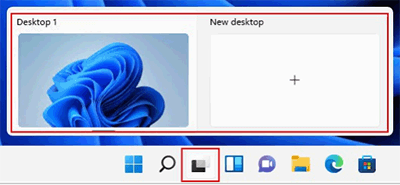
Virtual desktops in Windows 11 allow you to create custom desktops for various circumstances - Windows 11 revives Widgets, which consolidate current information generated by various apps and services. This information can include weather, news, stocks, calendar, and other dynamic data. Users can add, remove, arrange, resize, and customize widgets according to their personal interests and work environment. Each user's newsfeeds are tuned automatically but users can specify topics and publishers.
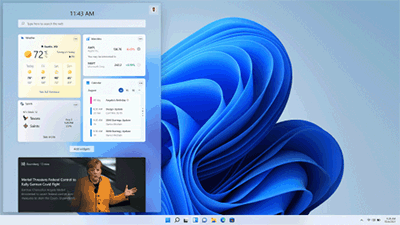
Widgets provide up-to-date info on user-specified topics like weather, news, stocks, and calendar - Android Apps can run natively on Windows 11. The new Windows Subsystem for Android allows a Windows 11 PC to run mobile apps from the Amazon Appstore. Installed apps can use cellular data if your Windows 11 PC supports a cellular connection and you have a data plan with a mobile service provider.
- TCP performance for high-speed networks is improved by the inclusion of the TCP HyStart++ and RACK-TLP algorithms in the Windows 11 transport stack. HyStart++ cuts down packet loss during connection start-up and RACK-TLP reduces Retransmit TimeOuts (RTOs).
Windows 11 Migration Services
Windows 11 will not work with older model CPUs or ones that do not include Trusted Platform Module (TPM) version 2.0. hardware. For in-place upgrades to Windows 11, generation 2 VMs must have two or more virtual processors, meet host CPU requirements, and have virtual TPM enabled. You cannot perform in-place upgrades of existing generation 1 VMs to Windows 11. For eligible devices, you can deploy Windows 11 as an upgrade to Windows 10 using familiar tools like Windows Autopilot, Microsoft Deployment Toolkit (MDT), Configuration Manager, and others. For PCs running Windows 8, you must first implement the free upgrade to Windows 10.
Because Windows 10 and Windows 11 can coexist, you can roll out Windows 11 at your own pace. You can run the same utilities and follow the same workflows to manage both types of clients. You can monitor endpoints, verify application compatibility, and automate Windows 11 deployments with the same tools you use with Windows 10. This ability to support a unified management environment simplifies Windows 11 migration. Progent can help you plan and carry out a Windows 11 migration that maximizes the utilization of your current IT assets including desktops, software tools, applications, services, and infrastructure.
Progent can provide these services to help you follow leading practices for each stage of your Windows 11 migration:
- Design a phased deployment strategy that includes developers and early adopters, piloting and proof of concept, and wide deployment
- Establish criteria for readiness to proceed to each consecutive deployment stage
- Evaluate deployment tools and make sure your migration plan is supported by your infrastructure, configuration, and policies
- Determine which apps will work unmodified, which need updates, and which need replacing
- Design an ongoing endpoint management and update management strategy
Additional Consulting Services for Windows 11
Progent offers a range of outsourcing and co-sourcing services designed to help organizations of all sizes to plan, implement, administer, and maintain hybrid networks that incorporate PCs and notebooks running Windows 11. Progent's Technical Response Center can act as a temporary and transparent extension of your in-house Call Center to provide online help from Microsoft-certified consultants to deal with the initial surge of service tickets you may face as you migrate to Windows 11. Common issues may involve areas such as app or driver compatibility, remote connectivity, or cybersecurity.
Progent's desktop management consultants and Windows 10 experts can streamline the management of your Windows 11 devices by providing efficient solutions for common tasks such as patch management, keeping track of licensing, monitoring usage and performance, and defending against cyber threats. Progent's mobile communications experts can help you create a centrally managed BYOD environment for your smartphone and tablet users by providing services such as iPhone and iPad integration and Android endpoint consulting. Progent's Wi-Fi configuration specialists can help you set up both permanent and ad-hoc Wi-Fi infrastructure for any venue including corporate headquarters, branch offices, home offices, and conference sites.
Progent's certified cybersecurity experts can assist your business to design, deploy, and test a network security strategy that incorporates the modern security features of Windows 11. Progent has developed a variety of affordable vulnerability assessment services to evaluate the security posture of PCs, laptops, and tablets powered by Windows 11. For ongoing IT security and maximum uptime, Progent offers the ProSight library of network management services which consists of a variety of 24x7 online IT monitoring services including Progent's ProSight LAN Watch server and desktop management services and ProSight WAN Watch network infrastructure monitoring based on advanced Remote Monitoring and Management (RMM) technology. Progent's Cisco-certified CCIE infrastructure experts can show you how to benefit from the leading-edge remote connectivity technology of Windows 11 and can help you create a unified communications solution that facilitates a BYOD environment and delivers modern cybersecurity, speed, and maximum availability.
To enhance manageability, security, economy, and availability for Windows 11 users, Progent's Hyper-V virtual client experts can help you deploy the Client Hyper-V feature included with Windows 11.
Contact Progent to Learn More About System Design and Migration Services for Windows 11
To find out more about how Progent can help you evaluate or migrate to Windows 11, call
Select Topic: