PC Desktop Consulting and Support Expertise
Full-Service Help Desk Call Center Outsourcing
Progent's Shared Help Desk Service
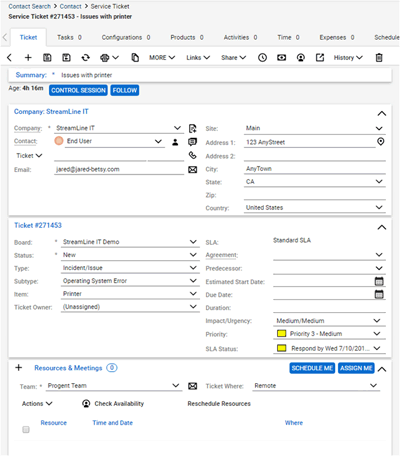
 Progent's Shared Help Desk service is designed for businesses with 50 to 500 end users and permits your IT staff to split responsibilities for Help Desk services seamlessly between your internal support staff and Progent's extensive roster of IT support engineers and subject matter experts (SMEs). Progent's Co-managed Service Desk is a joint IT service solution based on ConnectWise Manage, the leading Professional Services Automation tool for administering IT support calls, issuing trouble tickets, designating ownership, monitoring progress, and producing management analytics. The price for Level 1 support for Progent's Co-managed Help Desk service averages under $18/user/month.
Progent's Shared Service Desk offers a seamless extension of your corporate IT support resources. Client interaction with the Help Desk, provision of technical assistance, issue escalation, trouble ticket generation and updates, efficiency metrics, and management of the support database are consistent regardless of whether issues are resolved by your in-house support organization, by Progent's team, or both. All client support requests are ranked as Level 1, 2 or 3 issues. Progent focuses on the service levels you select (typically Level 1 and Level 3). Initial support calls are routed to your internal support staff or to Progent's Technical Response Center, based on your preferences. Level 2 or 3 issues can be promoted to Progent's Experts Team of subject matter experts (SMEs). The assignment activity is transparent to your end users. Your business has unrestricted versatility to expand or reduce your share of technical support activity as required. Progent provides startup deployment and onboarding of the professional services PSA software as well as documentation, validation and training.
Progent's Technical Response Center
Progent's Technical Response Center (TRC) has been delivering remote IT support for more than two decades and has active customers in each state in the U.S. (see Progent's customer testimonials.) The TRC provides the pool of certified computer technicians who can handle Level 1 issues, which represent the majority of Help Desk support requests. The Technical Response Center, like Progent's Experts Team, uses the ConnectWise Manage professional services automation (PSA) software platform to automate ticketing, status tracking, responsibility assignment, escalation and management reporting. This proven solution prevents tickets from being ignored and offers clients clear visibility of all services delivered. The TRC is committed to 90% in-person answer performance and enables Progent's Shared Service Desk program to offer a 60-minute service-level agreement. Support hours are 5am to 7pm Pacific Time on standard work days. Extended hours and onsite service are available at extra cost. For more details about the Technical Response Center, see The Technical Response Center Customer Commitment.
Definition of Service Levels
Progent provides three distinct levels of remote IT service, which align with industry-standard Tier 1 to Tier 3 service. You can pick which support levels will be provided wholly or in part by Progent's support team and your in-house staff. The depth and technical breadth of Progent's roster of subject matter experts (SMEs) enables fast and effective ticket escalation and permits you to rely on Progent as a one-stop source for the majority of support issues at any Tier. In addition, Progent's practice of knowledge transfer permits important support issues to move from higher to lower levels as solution processes become documented and normalized so they can be performed by less knowledgeable and less expensive support personnel.
Support levels are defined as:
- Level 1 Support: Categorizes Service Desk requests and provides baseline technical help and troubleshooting, such as password resets, printer set up, break/fix instructions, ticket assignment and promotion to Level 2 and Level 3 support. A Level 1 tech gathers and analyzes information about the user's issue and determines the best way to resolve the problem. Level 1 service can also include support for familiar Level 2 or 3 problems where solutions have previously been recorded.
- Level 2 Support: Primarily addresses break/fix, configuration problems, troubleshooting, software installations, and hardware repair such as on-premises repair or orchestrating depot services. This Level involves escalated issues that Level 1 support is not equipped to handle. Level support can occasionally migrate to Level 3, based on the problem and the way the Help Desk is structured.
- Level 3 Support: Troubleshooting, configuration, database administration, and fixes or updates for OS and applications servers, cloud integration, email, collaboration, and various integration issues. In addition to possessing the capability to deploy fixes to new issues, a Level 3 consultant usually has the most real-world expertise.
A common sample of a ticket lifecycle is the case where you want Progent's Technical Response Center to triage all support calls. In this scenario, Progent may be tasked with dealing with all the Level 1 issues your end users initiate. Progent can route the remaining service requests to your internal network support staff. Your internal support group would then take on the Level 2 problems they have the skills and bandwidth to handle and escalate any remaining requests to Progent's Experts Team.
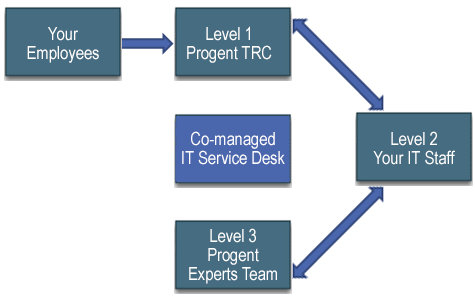
This particular implementation of Progent's Shared Help Desk Service has a 4-stage trouble ticket lifecycle:
- Your users generate service requests through the browser-based support, a dedicated telephone number, or by sending a message to a dedicated mailbox. This automatically launches an open request in the trouble ticket system.
- Progent's Technical Response Center gets the ticket request and determines whether it will be serviced or escalated to your internal Help Desk.
- Your Help Desk receives the escalated ticket request and decides the appropriate method to resolve the issue. If needed, your Service Desk can in turn escalate the open request back to Progent for assignment to Progent's Experts Team.
- Progent gets the revised trouble ticket request, selects the most appropriate subject matter exert from the Experts Team, and assigns the designated subject matter exert to collaborate with your support group until the issue is resolved or closed.
Key Features of Progent's Help Desk Service
Top features of Progent's Co-managed Call Desk program are:
- Pooled Level 1 help from Progent's Technical Response Center (TRC) staff
- Desktop online help available 5 days a week, 5am-7pm PST, 60 Minute SLA
- Special per-hour support rate with per-minute granularity for Tier 1 desktop support for end users
- Average price of Level 1 service is around $18 montly per user
- Level 2 and Level 3 support from Progent SME provided on request at Progent's standard consulting fees
- De-escalation allows problems that initially require Level 2 or 3 support to drop to a lower, less expensive Tier once solutions are documented
- StreamlineIT provides a full version of ConnectWise Manage with multi-tenant security
Progent's Co-managed Service Desk program is designed to offer a versatile, collaborative call desk solution for mid-size organizations. Specifics of these services, with Progent responsible for Level 1 support, include:
- Available only in USA and US territories
- Initial startup fee based on complexity of the solution
- Starting the first day, Progent assigns you a Technical Resource Center (TRC) Coordinator and a TRC Service Lead to resource, assign and communicate with your service group and your clients. Progent's TRC Service Lead will work closely with you to develop a What Goes Where document to help seamlessly escalate to your team or de-escalate back to Progent's team of engineers.
- Live Answer of incoming support requests to Progent Technical Response Center (TRC) with a target of 90% Live Answer of all calls
- After determining if server or network infrastructure assistance is needed, some service requests will be passed to Level 2 or Level 3 support
- All support that needs Level 2 or Level 3 expertise will be worked on by a Progent SME pending customer authorization
- 1 hour SLA for Level 1 desktop support in most cases
- Level 1 Service is for your client users and covers Windows-powered computers and Apple devices
- Progent Level 2 or 3 services will be provided at standard hourly consulting rates
- Progent will provide personnel - Technical Response Center (TRC) desktop specialists during standard hours, Level 2 and Level 3 as required
- Progent will dedicate a phone number and email mailbox for incoming support requests
- Free Remote Control agent with screen sharing for efficient technical support
- Free ProSight IT Asset Management system for professional IT documentation management
- All Level 1 remote support is billed at a special desktop hourly rate with one-minute granularity
- All Level 1 service is done remotely, no onsite work included
- All on-premises support will be invoiced at regular hourly consulting rates
- All onsite support will have an additional fixed charge plus any documented travel costs
- All travel cost estimates will be disclosed and need customer approval before support services or travel will be performed
- Projects and separate Statements of Work (SoWs) will have their individual estimates and costs defined and will be undertaken only following approval by client
Progent's proven deployment process permits your business to migrate transparently to a co-managed Help Desk and a modern ticketing and reporting system. Major steps in the onboarding process for Progent's Shared Service Desk include:
First Steps
- Create your personalized Help Desk experience, including your internal support group, locations, and client information
- Progent will work closely with your company's support group to review current incoming support calls
- Configure your inbound support request system to incorporate email, software agents, and a dedicated telephone number
- Progent delivers trouble ticket management training for your service group
- Jointly define basic workflow and escalation procedures
- Integrate all your groups and assets that will provide support services
- Create the announcement message and selling of the new Call Desk environment
- Designate a specific location or small groups to onboard initially
- Integrate more users into the system at determined intervals
- Review reports and system setup for efficient data and processes
- Add any reports or fields required to improve the detection or tracking of frequently seen IT problems
- Surface key data that might enable a better success rate for Level 1 support requests
- All users have been introduced to the support system and can access it
- All required user and equipment data is populated in the service system
- You are able to transfer and administer tickets transparently between your in-house team and Progent
- You are able to monitor support performance and trends
Progent's Co-managed Service Desk delivers a variety of advantages that allow you to provide users fast and effective IT services while simultaneously cutting expenses and reducing administrative burden. Advantages of Progent's Co-managed Service Desk include:
- Keep total control over your IT service requests: you choose what tickets are forwarded to Progent's service group or taken care of by your in-house support staff.
- Fast availability of supplemental IT support experts when you require them: Progent's professional services automation (PSA) software automatically routes in-house trouble tickets or permits you manually escalate to Progent's Technical Response Center.
- Efficiency: Progent's team will review your inbound support requests and identify missing information that would allow a higher success rate for typical Level 1 issues. Progent's IT support experts can also help you to improve tag management to speed up problem resolution.
- Transparency: Progent's Co-managed Help Desk is a seamless supplement to your internal Help Desk with centralized ticketing and reporting so no ticket drops between the seams.
- Happy workers: End users can monitor the progress of their IT service requests quickly and easily.
- Management analytics: You benefit from the metrics, accountability, and activity reporting of a modern PSA system to assist you to create a custom Service Desk experience that provides top business value.
- Focus on your strategic business activities, not IT service requests and unhappy workers: Your IT managers avoid being bogged down handling ordinary service calls.
Check Out Progent's White Paper: Is Co-managed IT a Good Idea?
Even though maintaining your own self-sufficient in-house network support staff can be a burden from the budgetary perspective, plenty of organizations opt for that strategy since it allows them greater flexibility with their network management. Yet did you know that your business can continue to leverage the advantages of a managed services provider using the co-managed IT service approach. This co-managed model permits your business to keep in control over your IT infrastructure while reinforcing your in-house IT staff simply and economically.
To learn more, read our white paper: Is co-managed IT a good idea? (PDF - 632 KB).
Download Progent's Co-managed Service Desk Datasheet
To download a one-page datasheet in PDF format describing Progent's Co-managed Service Desk, see:
Progent's Shared Help Desk Datasheet. (PDF - 108 KB)
Progent's ProSight Family of RMM Services
Progent has packaged the ProSight family of remote monitoring and management (RMM) services to automate vital activities associated with network management, cybersecurity and maintenance. These RMM services can be used with Progent's Co-managed Help Desk service by installing agent apps on machines to be tracked and managed. Notifications generated by these agents can be forwarded automatically to Progent's Technical Response Center (TRC), managed through the ticketing and monitoring system, and triaged for Level 1, 2 or 3 treatment.
Samples of ProSight RMM services include:
- ProSight LAN Watch: Network, Server, and Endpoint Monitoring
 ProSight LAN Watch is Progent's network, server, and endpoint monitoring service that incorporates state-of-the-art remote monitoring and management (RMM) technology to keep your network operating at peak levels by checking the state of critical computers that power your business network. When ProSight LAN Watch detects an issue, an alert is sent automatically to your designated IT personnel and your Progent engineering consultant so any looming issues can be resolved before they can impact your network. ProSight LAN Watch is National Institute of Standards and Technology (NIST) compliant. Find out more about ProSight LAN Watch network, server, and endpoint remote monitoring services.
- ProSight LAN Watch with NinjaOne RMM: Centralized RMM Solution for Networks, Servers, and Workstations
 ProSight LAN Watch with NinjaOne RMM software offers a centralized, cloud-based solution for monitoring and managing your client-server infrastructure by offering tools for streamlining common tedious jobs. These can include health monitoring, update management, automated repairs, endpoint deployment, backup and restore, A/V response, secure remote access, built-in and custom scripts, resource inventory, endpoint status reports, and debugging help. When ProSight LAN Watch with NinjaOne RMM spots a serious issue, it transmits an alert to your designated IT management staff and your Progent technical consultant so that potential problems can be taken care of before they interfere with productivity. Learn more details about ProSight LAN Watch with NinjaOne RMM server and desktop remote monitoring consulting.
- ProSight WAN Watch: Infrastructure Remote Monitoring and Management
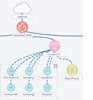 ProSight WAN Watch is an infrastructure management service that makes it simple and affordable for smaller organizations to diagram, track, reconfigure and troubleshoot their connectivity hardware such as switches, firewalls, and access points as well as servers, printers, endpoints and other networked devices. Incorporating state-of-the-art Remote Monitoring and Management (RMM) technology, ProSight WAN Watch ensures that network maps are always current, captures and displays the configuration information of virtually all devices on your network, tracks performance, and sends notices when problems are detected. By automating complex management and troubleshooting activities, ProSight WAN Watch can cut hours off common chores such as making network diagrams, expanding your network, locating appliances that require critical updates, or resolving performance problems. Learn more about ProSight WAN Watch infrastructure management services.
- ProSight Reporting: Real-time and In-depth Reporting for Ticketing and Network Monitoring Platforms
 ProSight Reporting is a growing family of real-time management reporting tools created to work with the leading ticketing and remote network monitoring platforms including ConnectWise Manage, ConnectWise Automate, Customer Thermometer, Auvik, and SentinelOne. ProSight Reporting incorporates Microsoft Graph and utilizes color coding to highlight and contextualize key issues like spotty support follow-up or machines with missing patches. By identifying ticketing or network health problems concisely and in near-real time, ProSight Reporting improves productivity, lowers management overhead, and saves money. For details, visit ProSight Reporting for ticketing and network monitoring applications.
- ProSight Data Protection Services (DPS): Managed Backup and Recovery
 Progent has worked with advanced backup/restore product vendors to create ProSight Data Protection Services, a portfolio of management outsourcing plans that provide backup-as-a-service (BaaS). ProSight DPS products automate and track your backup operations and enable non-disruptive backup and rapid recovery of critical files/folders, apps, system images, and Hyper-V and VMware virtual machines. ProSight DPS lets you recover from data loss resulting from equipment failures, natural calamities, fire, malware such as ransomware, human mistakes, ill-intentioned insiders, or software bugs. Managed backup services available in the ProSight Data Protection Services selection include ProSight Altaro VM Backup, ProSight 365 Total Backup (formerly Altaro Office 365 Backup, ProSight DPS ECHO Backup using Barracuda purpose-built storage, and ProSight MSP360 Hybrid Backup. Your Progent expert can help you to identify which of these fully managed services are most appropriate for your IT environment.
- ProSight Email Guard: Inbound and Outbound Spam Filtering and Data Leakage Protection
 ProSight Email Guard is Progent's spam filtering service that incorporates the infrastructure of top data security companies to deliver web-based management and world-class protection for your email traffic. The hybrid structure of Progent's Email Guard integrates a Cloud Protection Layer with an on-premises security gateway device to offer advanced protection against spam, viruses, Denial of Service (DoS) Attacks, Directory Harvest Attacks (DHAs), and other email-borne threats. The cloud filter serves as a first line of defense and blocks most threats from making it to your security perimeter. This decreases your vulnerability to inbound attacks and saves network bandwidth and storage space. Email Guard's onsite gateway device provides a deeper layer of inspection for inbound email. For outgoing email, the on-premises gateway provides AV and anti-spam protection, DLP, and email encryption. The local gateway can also assist Microsoft Exchange Server to monitor and safeguard internal email that originates and ends inside your corporate firewall. For more details, see ProSight Email Guard spam and content filtering.
- ProSight MFA with Duo: Identity Validation, Endpoint Policy Enforcement, and Protected Single Sign-on (SSO)
 Progent's Duo authentication services incorporate Cisco's Duo technology to protect against compromised passwords through the use of two-factor authentication (2FA). Duo enables one-tap identity verification on Apple iOS, Google Android, and other out-of-band devices. With Duo 2FA, whenever you log into a protected application and enter your password you are requested to confirm who you are via a device that only you possess and that is accessed using a different ("out-of-band") network channel. A wide selection of devices can be used as this added form of authentication such as an iPhone or Android or wearable, a hardware/software token, a landline telephone, etc. You may designate multiple verification devices. To find out more about ProSight Duo identity validation services, visit Duo MFA two-factor authentication services for access security.
- ProSight Shared Help Desk: Outsourced and Co-managed Call Desk Services
 Progent's Co-managed Help Desk Service provides a smooth extension of your core network support staff. End user interaction with the Help Desk, delivery of support services, issue escalation, ticket creation and tracking, efficiency measurement, and management of the support database are cohesive whether issues are resolved by your core support organization, by Progent, or a mix of the two. You have unrestricted versatility to extend or reduce your share of technical support work as circumstances demand. Progent takes care of initial installation and onboarding of the professional services automation (PSA) software plus documentation, testing and education. To learn more about ProSight Shared Call Desk, go to ProSight Co-Managed Help Desk.
- ProSight Active Security Monitoring: Behavior-based Threat Scanning and Ransomware Protection:
 ProSight Active Security Monitoring (ASM) is an endpoint protection (EPP) service that utilizes cutting edge behavior-based analysis tools from SentinelOne to guard physical and virtual endpoint devices against new malware attacks like ransomware and email phishing, which easily get by legacy signature-based anti-virus tools. ProSight ASM safeguards on-premises and cloud resources and offers a single platform to address the complete threat lifecycle including blocking, detection, mitigation, remediation, and forensics. Top features include one-click rollback with Windows VSS and real-time system-wide immunization against newly discovered threats. Progent is a SentinelOne Partner, dealer, and integrator. Find out more about Progent's ProSight Active Security Monitoring endpoint protection and ransomware recovery with SentinelOne technology.
- Progent's Patch Management: Patch Management Services:
 Progent's support services for software and firmware patch management offer organizations of any size a versatile and affordable solution for assessing, testing, scheduling, applying, and tracking software and firmware updates to your ever-evolving information network. In addition to maximizing the protection and reliability of your computer network, Progent's patch management services allow your IT team to focus on line-of-business projects and activities that deliver the highest business value from your information network. Learn more about Progent's software/firmware update management support services.
As a Microsoft AI Cloud Partner, Progent offers your users quick and reliable contact with a proven Service Desk group able to deliver technical support. Progent has decades of experience providing phone support for IT systems built on Microsoft products. Progent's focus is on giving the Call Desk a positive image as a major factor in your organization's success. Progent tries to resolve rather than merely monitor problems, and Progent's goal for established customers is to fix 80% or more of Call Desk support issues on the initial call. First-call resolution is an important driver in controlling Call Desk expenses, improving the reputation of the IT group in general and the Service Desk in particular, and increasing client productivity and satisfaction.
How to Get Started with Progent's Shared IT Help Desk Call Center Support
To learn additional information about Progent's Co-managed IT Help Desk Services, phone
Select Topic: