Cloud and VM Integration and Management
ProSight Data Protection Services:
Hornetsecurity Altaro VM Backup Services
ProSight Data Protection Services (DPS) - Hornetsecurity Altaro VM Backup
Hyper-V and VMware Virtual Machine Backup
 ProSight Hornetsecurity Altaro VM Backup is a managed service intended to provide small and middle-size organizations a robust and low-cost option for backing up and recovering Hyper-V and VMware-based virtual machines. ProSight DPS Altaro Backup can be used with local, remote, multi-location, and cloud network models and also offers cost-effective backup to an Azure Blob storage service.
Key capabilities of ProSight Hornetsecurity Altaro VM Backup include industry-leading Augmented Inline Deduplication to cut backup storage size, Continuous Data Protection with backup spacing down to five minutes for reducing your vulnerability to lost data, military-grade data encryption, flexible restore options for entire virtual machines or for individual files and emails, extensive integration with Windows Server Cluster Shared Volumes and VMware, and the ability to leverage Microsoft Volume Shadow Copy Service (VSS) to back up live VMs without downtime.
Progent is an Hornetsecurity Altaro partner and offers a wide assortment of services to assist your business to design, implement, validate and troubleshoot a data protection solution based on Hornetsecurity's VM Backup platform. Progent also has developed ProSight Data Protection Services Altaro VM Backup as a subscription service to deliver remote management of your backup system. Progent's Windows Hyper-V experts and VMware vCenter and vSphere integration experts can assist your organization to design and manage virtual machine deployments that utilize on-premises or remote VMs or that use a hybrid architecture that combines on-prem and cloud-based resources. Also, Progent can provide business continuity/disaster recovery (BCDR) planning expertise to help businesses to rebound from catastrophes such as ransomware assaults and natural disasters.
Key Features of Hornetsecurity/Altaro VM Backup
Hornetsecurity/Altaro VM Backup is built to address the backup/recover requirements of typical small and midsize organizations and offers ease of management plus a rich set of features typically found exclusively in enterprise-grade platforms. Altaro backs up widely used releases of Hyper-V and VMware vCenter and works with most backup hardware:
| Hyper-V OS | VMware OS | Media |
|
Windows Server 2022 Windows Server 2019 Windows Server 2016 Windows Server 2012 R2 Windows Server 2012 Windows Server 2008 R2 Hyper-V Server (Core) Azure Stack HCI |
VMware vCenter V(5.0, 5.1, 5.5, 6.0, 6.5, 6.7 & 7.0) VMware vSphere V(5.1) ESXi V(5.0) (Free ESXi is not supported) |
USB Drives eSata Drives USB Flash Network Shares NAS devices PC Internal Drives RDX Storage Altaro Offsite Server |
Altaro VM Backup comes with advanced features in critical areas of data protection such as replication, fast restoration, and management and reporting.
Replication
Altaro VM Backup offers fast, economical, and secure backup for data protection and archiving plus offsite data replication for dependable recovery. Top backup and replication features include:
- Ransomware Defense leveraging Immutable Cloud Storage: Immutable backup for cloud storage allows tamper-proof data for a set duration so that backup data cannot be modified or deleted by any user including administrators or root users. Immutable storage adds an extra level of security and restoration ability in the event of a ransomware breach.
- Global Augmented In-Line Deduplication: Altaro's in-line deduplication sends only changed data to backup storage devices or sites, conserving bandwidth, cutting storage requirements, and improving performance. Altaro's deduplication works with data on single virtual machines and on many virtual machines.
- Continuous Data Protection (CDP): Rather than running one-a-day backups, you can reduce backup spacing to as brief as five minutes to lower your RPO.
- Concurrent Backups: You can back up many VMs simultaneously, allowing you to carry out backup operations during shorter off-hour time windows while more network bandwidth is open and workload performance is less critical.
- Live Backup: Integration with Volume Shadow Copy Service (VSS) allows you to back up VMs without going offline.
- Cluster Shared Volumes and VMware vCenter: The ability to protect VMs within a Windows Hyper-V Failover Cluster (with or without Cluster Shared Volumes) or in a vCenter environment supports large-scale implementations.
- Remote Replication: To facilitate disaster recovery, you can deploy Altaro's Offsite Server tool on a remote server for storing a copy of your backups at a remote location.
- Flexible Scheduling and Retention Policies: You can set different backup schedules and retention policies for individual VMs.
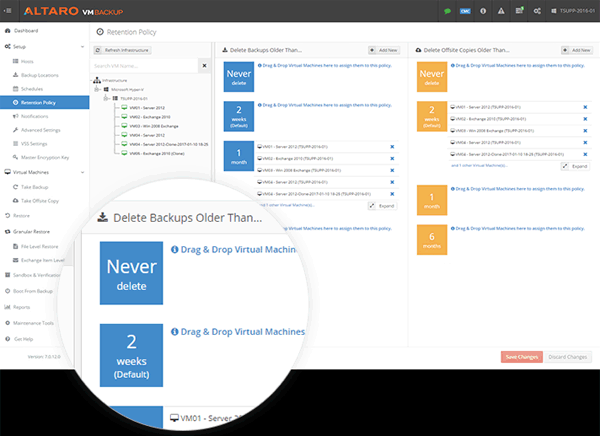
Scheduling and retention policies for Altaro VM Backup are easy to configure, review and edit - Workload Specific Protection: Altaro VM Backup can use Volume Shadow Copy Service and all VSS Writers working inside the target virtual machine when making a backup. Apps including Microsoft Exchange and Microsoft SQL will be aware the backup has happened and automatically run the appropriate maintenance procedures like truncating virtual log files.
- Military-Grade Encryption: Before copying your data to a backup device, you have the option of encrypting it using the AES-256 standard.
- Virtual Disk Exclude: You have the ability to specify which Virtual Disks to include or exclude in your VM backups.
- Grandfather-Father-Son Archiving: On top of your continuous and daily backups, you can set up an additional schedule to make and archive a backup copy each week, month and year.
- Cloud Backup to Microsoft Azure: Altaro VM Backup allows backup to a Microsoft Azure Block Blob storage account, which is the most affordable storage option available on the Azure cloud.
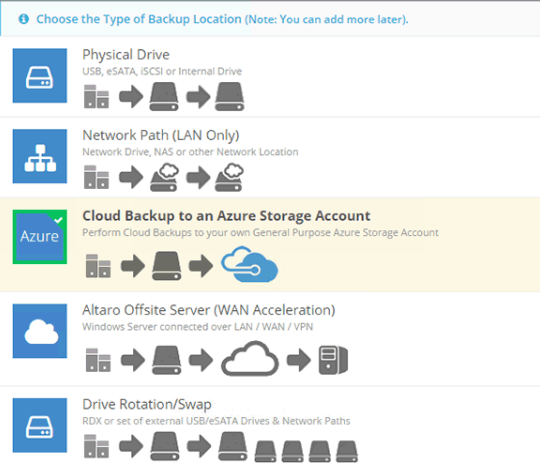
Altaro VM Backup allows you to protect virtual machines hosted on-site, remotely or in the cloud - Cloud Backup to Amazon S3 and Wasabi: Altaro VM Backup VM Backup allows native backup to Amazon S3 and Wasabi clouds. No extra resources running in the cloud are necessary to support storage for backup.
- Back up to multiple remote datacenters: For improved resilience, you can create copies of VMs on multiple off-premises sites including multiple clouds like Microsoft Azure and Amazon Simple Storage Service (S3).
Altaro VM Backup offers a comprehensive toolset for point-in-time recovery of VMs and files that have been backed up on schedule and have to be recovered. In a disaster recovery scenario, Altaro VM Backup VM Backup has utilities for rapidly restoring an entire site using the most recent copy protected on a safe remote site.
- Recover as Clone: You can recover a virtual machine backup to a new location with a new name, permitting the cloned VM to run beside the original VM. This avoids the need to overwrite live virtual machines.
- Restore to Different Host: You can restore a VM backup to a new or different host. The VM can be recovered from the on-prem backup location, or directly from the remote copy location. (You cannot cross-restore between Hyper-V and VMware.)
- Boot from Backup: You can immediately boot any virtual machine version from the backup location either for verification or to achieve a major improvement in Recovery Time Objective (RTO) during a disaster recovery event.
- File-Level Recovery: You can quickly restore specific files from any virtual machine copy.
- WAN-Optimized Replication: You can create continuous backups of your virtual machines to an off-premises site and switch immediately to the copy location in the event that a calamity takes out your primary virtual machines. This can significantly shrink your Recovery Time Objective (RTO) and get your organization back online fast.
- Exchange Item-Level Recovery: You can restore individual emails from the Exchange Mailbox.
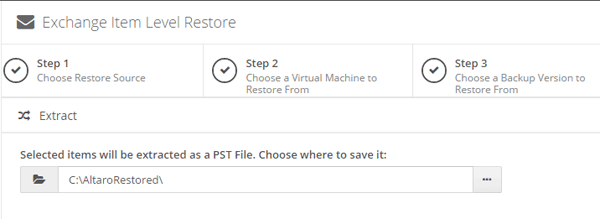
Altaro VM Backup permits you to restore specific emails from an Exchange Mailbox - Restore Various Versions: You can recover from different periods rather than being restricted to the last backup.
- Sandbox Restores and Testing: This feature lets you program or run manually tests to assess the accuracy of your backup data. You can verify backup folders without connecting the virtual machine to your Windows Hyper-V or VMware Hypervisor, or you can run a complete test restore to a replicant and ensure that the restored VM can boot.
- Backup Health Monitor: Backup storage accuracy can be checked on demand and repaired automatically as a component of the next backup operation.
The web-based Cloud Management Console centralizes management, monitoring and reporting for Altaro VM Backup deployments. The Cloud Management Console provides a centralized portal for tasks such as launching backups, setting up on-premises and off-premises backup sites, defining encryption keys, and recovering VMs. The CMC also conserves time by allowing you to set specialized templates with backup schedules, retention details and other settings and assign them to multiple VMs across a selection of hosts. In addition, you can utilize the CMC to monitor backup activities as they occur, review historic reports on operations and errors, and program the CMC to send email alerts for completed or failed processes and other important information.
Download ProSight Altaro VM Backup Services Datasheet
To view a datasheet describing the major features of ProSight Altaro VM Backup Services, click:
Progent's ProSight Altaro VM Backup Services Datasheet. (PDF - 310 KB)
How Progent Can Help Your Business to Get the Most from Hornetsecurity/Altaro VM Backup
Progent's Microsoft-certified Windows Server Hyper-V planning and deployment experts and VMware-certified vSphere and vCenter consultants can help you to plan, deploy and maintain a backup/recover system based on Altaro VM Backup software. Progent's Exchange consultants can help your business to use Altaro VM Backup to safeguard your Exchange system, and Progent's Microsoft Azure hybrid cloud consulting specialists can help your company to utilize your Azure Block Blob storage with Altaro to protect your virtual machines.
Progent's disaster recovery preparedness experts can assist you to use Altaro's replication tools and remote backup capability to safeguard your critical data and enable you to resume your vital services quickly in case of a calamity.
Ongoing validation, testing, and enhancement of data restoration are vital and frequently underappreciated requirements for effective disaster preparedness. In the event of a disaster like a ransomware attack, these restoration drills can spell the difference between a temporary period of downtime and an existential threat to a business. Progent can assist you to create a workflow for regularly verifying, testing, and optimizing your recovery procedures in order that you can keep your backup strategy up to date and contain the damage of a catastrophic event.
Progent's GIAC information assurance experts can gauge the security profile of your data protection system and can assist your business to deploy the latest technology and adhere to industry best practices for working safely in today's threat landscape.
Contact Progent for Virtualization Expertise and Cloud SolutionsFor expert help with virtualization, server management, or cloud solutions, call Progent at
Select Topic: