Cisco Expert Network Consulting and Support
Network Management Solutions
From CCIE and CCNP Certified Professionals
Network management systems assist organizations to deploy infrastructure effectively, access user details quickly, track network operation, troubleshoot problems, protect against and react to threats, and optimize performance. Network management systems can spot inefficient or improper uses of network services like streaming media or peer-to-peer file sharing that can waste bandwidth, reduce worker productivity or enable data leakage. A prudently planned network management environment can also help companies to make informed capacity planning decisions by surfacing tendencies in network usage for different periods or jos.
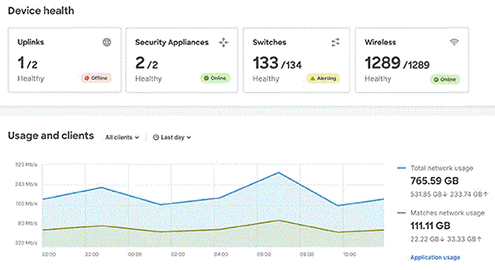
Cisco offers a rich and expanding portfolio of network management solutions that allow centralized management for local, cloud-based, or hybrid network architectures. With Cisco's newer generation of security, switching, and Wi-Fi networking devices, you can run Meraki, DNA Center, or CLI management platforms for network monitoring and management. For example, you can connect newer Catalyst or Meraki switches and Catalyst or Meraki Wi-Fi APs to the Meraki dashboard to monitor and manage critical layers of your corporate infrastructure from the cloud. Progent's Catalyst WiFi AP experts, Cisco Meraki WiFi access point experts, Catalyst switches integration experts, and Cisco Meraki switches consulting experts can assist you to plan, implement and tune an up-to-date environment for network monitoring and management.
Traditional Network Management Platforms from Cisco and Others
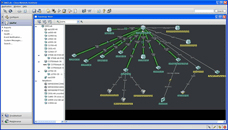 A wealth of network management tools from Cisco and other suppliers highlights the value and complexity of maintaining networks. Progent's Cisco qualified network management engineers are expert at helping businesses develop management solutions utilizing on Simple Network Management Protocol (SNMP), Syslog, and Cisco Netflow protocols to build effective tools for understanding network bandwidth usage and network latency, monitoring key router and switch operational metrics, and identifying traffic patterns, processes, and devices utilizing available services.
Progent can help businesses to utilize a broad selection of free and proprietary monitoring and management tools to maintain a Cisco-powered environment. Tools used by Progent's consultants include MRTG, Nagios, PRTG, Cisco Cisco Adaptive Security Device Manager, Cisco Monitor Manager, Cisco Network Assistant, CiscoWorks, Cisco Security Manager, OpenView, Wireshark/Ethereal, AlterPoint DeviceAuthority, Advent and Firewall Analyzer, Solarwinds Orion, and Necordia NetMRI.
Network management platforms can allow organizations to understand current system utilization and effectively plan for downstream traffic increases. Network management tools can also be used to highlight inefficient or inappropriate utilization of network resources, such as streaming audio and video, peer-to-peer sharing, etc. that can use up valuable or limited network bandwidth. A carefully planned network management plan can also help companies to make intelligent decisions on system improvements once they recognize the amount of system bandwidth actually needed at any one time.
Having an efficient network management system in place in advance is essential to prevent major problems that can result from Denial Of Service (DoS) attacks and dangerous viruses. Such events can render the network unstable and without proper tools it can be time consuming, and in some cases virtually impossible, to discover the location of the trouble.
Network Management Products from Cisco
A wealth of network management tools from Cisco and other suppliers highlights the value and complexity of maintaining networks. Progent's Cisco qualified network management engineers are expert at helping businesses develop management solutions utilizing on Simple Network Management Protocol (SNMP), Syslog, and Cisco Netflow protocols to build effective tools for understanding network bandwidth usage and network latency, monitoring key router and switch operational metrics, and identifying traffic patterns, processes, and devices utilizing available services.
Progent can help businesses to utilize a broad selection of free and proprietary monitoring and management tools to maintain a Cisco-powered environment. Tools used by Progent's consultants include MRTG, Nagios, PRTG, Cisco Cisco Adaptive Security Device Manager, Cisco Monitor Manager, Cisco Network Assistant, CiscoWorks, Cisco Security Manager, OpenView, Wireshark/Ethereal, AlterPoint DeviceAuthority, Advent and Firewall Analyzer, Solarwinds Orion, and Necordia NetMRI.
Network management platforms can allow organizations to understand current system utilization and effectively plan for downstream traffic increases. Network management tools can also be used to highlight inefficient or inappropriate utilization of network resources, such as streaming audio and video, peer-to-peer sharing, etc. that can use up valuable or limited network bandwidth. A carefully planned network management plan can also help companies to make intelligent decisions on system improvements once they recognize the amount of system bandwidth actually needed at any one time.
Having an efficient network management system in place in advance is essential to prevent major problems that can result from Denial Of Service (DoS) attacks and dangerous viruses. Such events can render the network unstable and without proper tools it can be time consuming, and in some cases virtually impossible, to discover the location of the trouble.
Network Management Products from Cisco
Cisco provides an array of powerful utilities that should be the basis for any network management solution. Used in conjunction with the top outside vendor tools, Cisco's network management offerings can enhance the competitive value of networks for companies of all sizes by dealing with key areas such as resource utilization, performance, resilience, protection, troubleshooting, and capacity planning. Cisco's most popular network management tools include:
Adaptive Security Device Manager (ASDM) is a browser-based Java applet that allows you to configure and monitor the management utilities built into security appliances. Cisco ASDM is loaded by the adaptive security appliance, and enables you to configure, track, and control the device.
Monitor Manager is a management and monitoring application intended to meet the requirements of small and midsize businesses (SMBs). Monitor Manager actively tracks important appliance processes on voice and data networks used by five to 250 users and equipped with up to 250 Voice over IP phones. The application offers:
- Up-to-date tracking of key device processes on Cisco SMB-class routers, switches, and voice gateways, Cisco Unified Communications Manager Express, Unity Express, security devices, wireless access points, and VoIP phones
- Support for the Unified Communications 500 Series communications appliance for companies with as many as 50 workers
- Network discovery and physical topology
- Physical and process looks at Unified Communications deployment
- Networkwide device identification collection and reporting
- Advanced security and reliable communication
- Device operations tracking
- Cisco Unified IP Telephony tracking
- Interface status and traffic tracking
- Immediate alerts and event notification
- Reports
- Configuration log
- Supports control of Cisco routers configured with an IOS security image, ASA 5500 firewalls, PIX security appliances, IPS 4200 family sensors, and Cisco Catalyst 6500 family security services modules
- Reacts faster. more rapidly to threats: specify and assign new security policies to thousands of devices in a few easy steps
- Intuitive GUI offers exceptional ease-of-use
- Multiple looks that offer versatile methods to control appliances and policies such as the option to manage the security environment graphically on a system topology image
- Comprehensive video help for the new user to accelerate learning time
- Globally call out which policies are shared and automatically inherited by new appliances to make sure corporate policies are implemented consistently, at the same time offering sufficient flexibility to customize policies at the individual device level
- Capability to create a common rule table for Cisco platforms with intelligent evaluation of firewall policies to determine anomalies within the rule base
- Quickly configure location-to-location, hub-spoke, full mesh, or extranet Virtual Private Network connections by means of a VPN wizard
- Integration with Cisco ACS for granular role based access management to devices and management functions
- Integration with security MARS system to correlate monitored data with related security appliance rules to enable faster management decisions and enhanced system up time
- Ability to assign particular jobs to every manager during the implementation of a policy, with structured change management and tracking; permits the security and network operations team to work in sync as a single group with efficient teamwork
Progent's Cisco-Certified network consultants can assist you to use Cisco's network management tools alongside a variety of effective open source and proprietary programs to create a complete network management strategy to keep your network running dependably, consolidate expensive resources, secure your information, recover rapidly from equipment breakdowns or malicious assaults, and enable you to expand or repurpose system hardware intelligently and economically as your company grows. Progent can also show you how to use network management utilities to analyze and classify network data to implement traffic shaping, which permits you to configure routers to enforce a variety of bandwidth restrictions on designated types of activity according to the priorities you specify. By buffering and queuing excess packets above your contracted rates, and by giving preference to business-critical processes, traffic shaping can prevent ISP overage charges from spinning out of control and/or avoid lost worker productivity resulting from brute force policing of your network traffic volume restrictions during peak demand. Progent's CISM and CISSP security professionals can help you to create a comprehensive security plan that incorporates your network management solution, and Progent's remote and on-premises network specialists and Cisco CCIE and CNA qualified engineers can use the latest network management technology to isolate and fix trouble quickly to keep your IT system productive. To find out additional details concerning Progent's engineering expertise for Cisco technology, pick a subject:
- Introduction to Cisco Expertise
- Fast and Affordable Online Support from a CCIE Consultant
- Cisco Firepower NGFW Series Firewalls: Configuration and Troubleshooting Support
- Cisco ASA 5500-X Series Firewall with Firepower: Consulting and Management Services
- Cisco ASA 5500 Series Firewall Integration Expertise
- PIX Series Firewall Maintenance Assistance
- Cisco Routers Consulting Expertise
- Cisco Wireless Network Design Services
- Aironet Access Points Consulting Services
- Cisco Small Business WiFi Access Points System Design Support
- Catalyst 802.11ax Wi-Fi 6/6E Wireless Access Points Planning, Deployment and Debugging Support
- Cisco Wireless Controllers Support Services
- Cisco Meraki Wireless Access Points Design Support
- Cisco Unified Communications Manager (CUCM or Unified CM) and Cisco CallManager Consulting and Technical Support
- Cisco VoIP Phones and IP Video Desktop Phones Consulting Services and Cisco Wireless VoIP Phone Solutions
- Cisco Jabber Consulting and Support Services
- Cisco Catalyst Switches Configuration and Maintenance Expertise
- Nexus Switches Consulting and Support Expertise
- Meraki Switches Deployment Expertise
- Cisco VPN and Network Security Setup and Troubleshooting Expertise
- SIP and CUBE Infrastructure Solutions: SIP Trunking and CUBE Integration Consulting
- Cisco Duo MFA Two-factor Authentication (2FA) Services for Teleworkers
- Design Expertise for Cisco-powered Data Centers
- Infrastructure Optimization Expertise for Service Providers
In order to ask Progent about professional support for Cisco networking, phone
Select Topic: