Microsoft-certified Consultants
SharePoint Server 2019 and SharePoint Server SE:
Design, Configuration, Management, Application Development
SharePoint Server 2019: Migrate to Modern Intranets
 SharePoint Server 2019 supports both the traditional SharePoint user experience as well as much of the modern experience whose code base is drawn from SharePoint Online. Besides being easy to use and offering additional capabilities, modern features in SharePoint are responsive, so they automatically scale with full fidelity to screens ranging from smartphones to desktop monitors. SharePoint Server 2019's support for both classic and modern experiences allows organizations to modernize their SharePoint environment at their own pace.
Migrating from SharePoint 2019 On Premises to a Current Version of SharePoint
SharePoint 2019 On-Premises reaches end-of-life (EOL) in July 2026. After that, Microsoft will no longer provide security patches, updates, mainstream or extended technical support, or bug fixes. Organizations will still be able to run SharePoint Server 2019 On-Premises, but they will risk increasing exposure to cyber attacks, compliance issues, downtime, remediation costs, legal fees, and reputation loss. For the latest version of SharePoint, Microsoft recommends that users of SharePoint 2019 On Premises upgrade to SharePoint Subscription Edition (SE) or to SharePoint Online.
Progent has delivered advanced consulting expertise for Microsoft SharePoint for two decades and has worked with every release since SharePoint 2001. Progent's Microsoft-certified SharePoint experts offer cost-effective remote and onsite consulting for every aspect of your SharePoint ecosystem including system design, deployment, integration, development, management, tuning, troubleshooting and training services. Progent can help you plan and execute an efficient migration from an older version of SharePoint to SharePoint Server SE or to SharePoint Online. Progent's consultants are available for services ranging from as-needed guidance and debugging to comprehensive project management.
Progent can also help you configure SharePoint server farms, intranets, extranets, sites, portals, blogs, wikis, data warehouses, BI and analytics, federated search, and workflows. Progent can help you integrate SharePoint Server SE or SharePoint Online with Windows Server, SQL Server, Exchange, Power BI, and the Office/365 family of applications like Outlook, Excel, Project, and Microsoft Teams.
Classic vs. Modern Features in SharePoint Server SE
SharePoint Server SE incorporates much of the modern experience of SharePoint Online, providing a transitional platform between the classic experience of SharePoint 2016 and the new SharePoint experience. Many classic features and their and modern equivalents in SharePoint Server SE share some but not all functionality, and some traditional features, like WiKi and web part site pages, have no modern equivalent. Conversely, some modern features with cloud dependencies, such as Microsoft Graph, have no classic version. SharePoint Server SE includes a library of modern web parts, but you cannot use classic web parts on modern pages or modern web parts on classic pages. Also, not all SharePoint Online modern web parts are available on SharePoint Server SE.
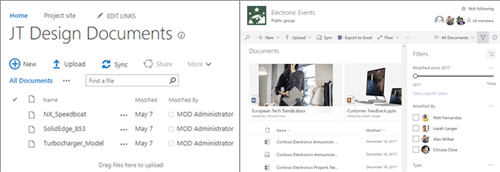
Converting from a classic to a modern style SharePoint page usually requires code devlopment and is well beyond the scope of a typical end user. Progent's SharePoint developers can help you plan and create modern pages based on your classic models when the time is right for your business to convert.
Deployment Options for SharePoint Server Subscription Edition
SharePoint Server 2019, now called SharePoint Server SE, is an on-premises (on-prem) version of SharePoint that was originally offered through a perpetual licensing model in an Enterprise and a Standard edition. SharePoint Online is a cloud-hosted version of SharePoint available on a subscription basis. Microsoft no longer offers the free Foundation edition of SharePoint.
The Enterprise edition of SharePoint Server SE offers unlimited virtualization and enhanced search features. The Standard edition is designed for smaller organizations or departments who need an on-prem information management platform that requires minimal network resources.
There are four basic deployment models for SharePoint Server SE:
- On-prem or in a private cloud
- As an IaaS service in a public cloud like Microsoft Azure
- As an SaaS service with Microsoft 365 SharePoint Online
- In a hybrid architecture that combines SharePoint Server SE with SharePoint Online cloud services
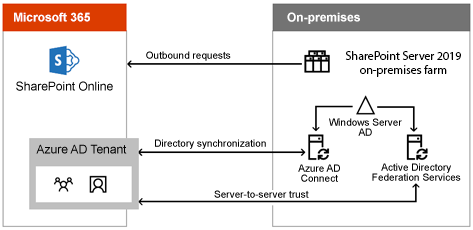
Hybrid deployments of applications that deal with sensitive corporate information are often implemented because industry or government regulations prohibit certain types of data to be stored off premises. In this case, a hybrid environment allows businesses to economize by using some cloud resources while still keeping sensitive information on an in-house network. In the case of SharePoint, an added advantage of a hybrid deployment is that it allows you to move to a modern experience gradually.
Progent can help you determine which deployment model makes sense for your organization and can help you transition from one architecture to another.
New and Enhanced Features of SharePoint Server SE
 SharePoint Server SE incorporates a great deal of technology initially built for and tested in SharePoint Online. This impacts both the functionality and the user interface (UI) of SharePoint Server SE, which is now more aligned with the familiar Microsoft 365 experience. In addition to introducing a modern experience for users, enhancements to SharePoint Server SE impact collaboration, scale, performance, security, infrastructure, and integration with cloud applications and services.
Progent's team of SharePoint integration and development experts can help you to evaluate the potential benefits of these new features for your business and assist you to design and implement a migration plan based on best practices to upgrade your legacy SharePoint environment to SharePoint Server SE.
New or improved features in SharePoint Server SE include:
- Modern Home Page
The SharePoint SE Home page is the new default start page. The Home page is a modern-style page that provides users easy access to their on-prem and online sites and portals and simplifies self-service creation of new modern-style Team sites, Communication sites, and OneDrive personal sites.
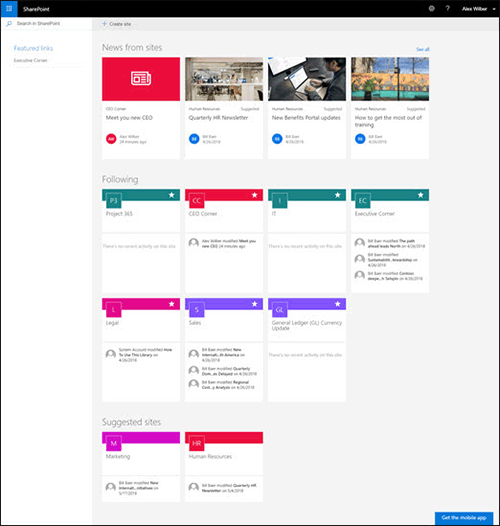
The Home page streamlines access to relevant sites and can launch self-service site creation - Communication Sites
A Communication site is a new type of SharePoint site that uses the Hero web part for rapid self-service creation of compact, loosely structured collaboration sites for sharing news or links and broadcasting messages across an organization. The simple creation process for a Communication site can be launched from the Create Site button in SharePoint Home, and the modern-style Hero web part and site templates are included with SharePoint Server SE.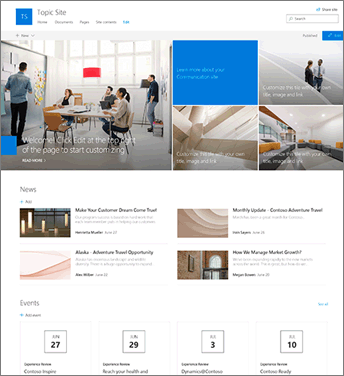
The Home page showcases relevant sites and news and can launch self-service site creation - Fast Site Creation for Team and Communication Sites
SharePoint Server 2019 adds rapid self-service site creation support for Team and Communication sites. Using templates included with SharePoint SE, it can take only seconds for users to create a OneDrive personal site, a Team site, or a Communication site. The fast site creation process can be launched via the SharePoint Home page, OneDrive personal site auto-provisioning, or a new PowerShell cmdlet. - Modern Search
SharePoint Server SE includes both the classic and the modern search experiences. The modern-style search displays results before users start typing in the search box and also updates results as users type. Both styles use the same search index and schema, and users can switch between styles with a click. Any changes administrators make to the search schema apply to both experiences. Administrators can customize the classic search experience but have less control over the modern style search. Hybrid Search is now included in the Hybrid Configuration Wizard.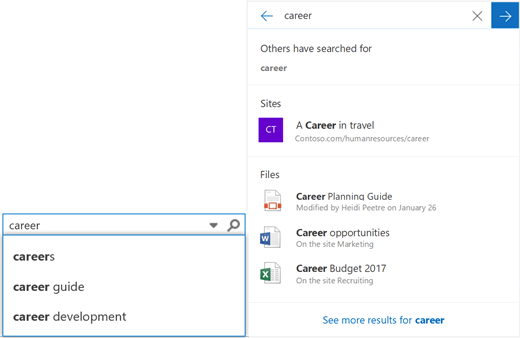
SharePoint Server SE supports both classic (left) and modern (right) search experiences - OneDrive Sync Client
The new Next Generation Sync Client (NGSC) replaces the Groove app for synchronizing on-prem files from SharePoint Server SE Team and Personal sites with PCs and mobile devices. NGSC is a modern-style OneDrive sync client and provides a faster and more reliable sync experience. New features include Files On-Demand, push notification for instant refreshes when changes are made to data, and Information Rights Management (IRM) protection. - Integration with Power BI, PowerApps and MS Flow
You can integrate Power BI content into SharePoint Server SE by using a local gateway as a bridge between your on-prem data and Power BI cloud services. This eliminates the need to move the on-prem data. Gateways also allow process automation and forms tools including PowerApps and Microsoft Flow to connect with SharePoint Server SE on-premises data. (See Progent's Power BI consulting services.) - SMTP Authentication
SharePoint Server SE can now authenticate SMTP email servers. Organizations often lock down their email infrastructure to block anonymous email connections. Because prior releases of SharePoint supported only anonymous connections, it was necessary to deploy anonymous relay servers with complicated rules just to accommodate email from SharePoint servers. The ability of SharePoint Server SE to authenticate directly to your email servers without a relay server simplifies administration and improves security. SharePoint Server SE supports popular authentication protocols like Kerberos, NTLM and LOGIN. SharePoint Server SE also continues to support anonymous connections. - Support for Large Files
The maximum size for SharePoint document libraries has been increased from 10GB in SharePoint Server 2016 to 15GB in SharePoint Server SE. Administrators can configure the maximum file-size limit for each Web Application on a SharePoint farm. - Faster I/O
Microsoft claims an improvement in file I/O speed of up to 25% in some scenarios compared to SharePoint 2016. - Expanded Character Support
The # and % characters are now valid in SharePoint Server SE file and folder names. This conforms fully with the set of valid filename characters in Windows and avoids errors when syncing content between mobile devices and SharePoint. - Expanded File Path Limit
The URL path limit has been expanded from 260 to 400 characters. This permits more descriptive names for sites, libraries, folders, and files. This also allows deeper nesting for organizing content. - Improved Recycle Bin Recovery
You can use your SharePoint recycle bin to recover your Team site documents after other team members have deleted them. You must have edit permission for the documents you want to recover. - Removed IIS2 Dependencies
All IIS6 dependencies in SharePoint Server SE APIs have been removed. Some of these legacy APIs date back to Windows 2003. By moving to IIS7+ APIs, the SharePoint platform will be able to take advantage of new IIS features and stay compatible with upcoming versions of Windows Server.
Migrating from an earlier version of SharePoint to SharePoint Server SE can be a challenge. SharePoint Server SE server farms run on Windows Server 2016 or later and SharePoint databases require SQL Server 2016 or later. To migrate from a legacy SharePoint environment, you must first upgrade to SharePoint 2016, then to SharePoint Server SE. There is not a one-to-one mapping of feature sets between classic and modern web parts, so upgrading older pages can call for careful planning, special coding, and user training.
Progent's certified Windows Server consultants, SQL Server SE integration consultants and SQL Server 2017 experts can help you update your host server environment and bring your SQL Server databases to 2016 schema level. Progent can also help you plan your modern SharePoint environment, design and carry out a phased migration plan, deliver software development expertise, and provide one-on-one and group training.
How Progent Can Help You with SharePoint Server SE
For 20 years, Progent has helped businesses of all sizes to plan, configure, manage, and debug intranet solutions based on SharePoint. As organizations have adopted cloud-centric and hybrid cloud network architectures, and as mobile devices have become the dominant endpoints, the technical challenges of implementing, administering, and securing SharePoint deployments have become imposing. Progent's team of Microsoft-certified experts has the knowledge to help customers with any aspect of their SharePoint ecosystem. Progent can help you maintain and tune a legacy SharePoint environment or migrate smoothly to a current release of SharePoint. Progent offers remote and onsite consulting and technical support, and stands out with the ability to provide clients with fast access to a top tier expert. Progent offers on-demand support to help you through occasional technical roadblocks or end-to-end project management services to make sure your SharePoint Server SE initiative is completed on time and on budget.
Progent's data protection experts and disaster recovery planning consultants can show you how to implement and verify backup/recovery processes that maximize availability and reduce the risk of data loss. Progent's security and compliance experts can help you enforce security policies that adhere to industry best practices and that cover on-prem resources, mobile devices, and cloud data. Progent's business intelligence consultants can help you integrate Microsoft's BI stack and visualization tools with SharePoint Server SE to create a modern, collaborative business analytics environment.
Progent's Cisco-certified CCIE infrastructure consultants can help you design, configure and manage a secure and efficient network architecture that delivers reliable access to IT resources located on prem and in the cloud. Progent can help you set up VPN access to SharePoint Online and Microsoft 365 and can help you configure and tune Cisco appliances including switches, routers, firewalls, VoIP systems, Wi-Fi access points, wireless controllers, and other components of a modern network infrastructure.
Save Time and Money with Progent's Online Consulting Services for SharePoint Server SE
For two decades, Progent's IT experts have provided online consulting, development, and troubleshooting services to businesses of all sizes throughout the U.S. (Refer to Progent's customer testimonials). Progent also offers onsite support in metropolitan areas throughout the United States and in Canada.
Download Progent's SharePoint Server SE and SharePoint Online Solutions Datasheet
To download a PDF datasheet about Progent's SharePoint Server SE and SharePoint Online consulting services, click:
Progent's SharePoint Server SE and SharePoint Online Consulting Services Datasheet. (PDF - 272 KB)
Contact Progent for Help with SharePoint Server SE
For more information about Progent's consulting, troubleshooting, training, or software development services for SharePoint Server SE, call
An index of content::
Select Topic: