macOS and Mac OS X, Linux, Solaris Expertise
Integration and Troubleshooting for Apple macOS, OS X and iOS:
Microsoft Office for Mac Integration and Support
 Progent's macOS and OS X experts can help your company to configure Office 365 for Mac on a cross-platform network so that Mac users are able to take advantage of the powerful capabilities in Microsoft Word, Excel, PowerPoint and Outlook for Mac to share information and network resources with fellow workers who use Microsoft Windows-based computers. Progent can also assist you to evaluate the benefits of moving to Office 365 for Mac from an earlier version of Office for Mac and help your company to plan and carry out an efficient migration strategy. Progent provides integration support for all applications supplied with Microsoft Office 365 for Mac and Office 2016 for Mac including:
- Word for Mac
 Office 365 Word for Mac and Word for Mac 2016 include a new Design Tab that provides immediate access to design elements and makes it simple to control layout, colors and fonts across a Word document. A new Insights Pane automatically searches for and shows relevant information from the web to provide useful context for authors and readers. Another new feature is threaded comments, which facilitates teamwork by allowing conversations and displaying them adjacent to the related content. Improvements include simpler tools for inviting colleagues to proof and edit documents, simultaneous coauthoring of documents, and integrated Mail Merge tools that utilize Word, Excel and Outlook. As with newer versions of Excel and PowerPoint for Mac, Office 365 Word for Mac lets you to navigate documents with familiar Multi-Touch gestures.
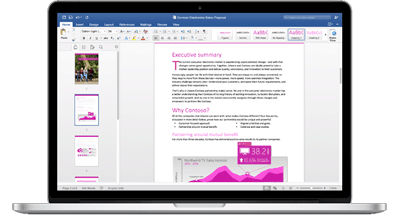
Microsoft Office 365 Word for Mac simplifies layout management and collaboration Microsoft Word for Mac 2011 includes enhancements in the areas of document viewing, template control, publishing, image editing, typography, document search, collaboration, and programmability. The innovative Focus View feature enables you to remove non-essential elements to increase the screen space dedicated to displaying your document. The new Word Document Gallery streamlines management of standard and custom templates and recently opened documents. Improved publishing functions include a better Publishing Layout view, the dynamic layer order, and additional image editing features that include background removal.
Word for Mac 2008 introduced an improved user interface that offers a customizable toolbar and incorporates a basic publishing toolset via the Publishing View that provides increased precision over positioning of text and graphics and allows users to link text overflow from one area to a specified text box on any page. Other features built into Word for Mac 2008 include support for OpenType ligatures for better looking fonts, and reference utilities that support a variety of citation styles. Microsoft Word for Mac 2008 supports AppleScript but does not support VBasic for Applications. Progent's Mac experts can assist your business to evaluate if this limitation might impact your decision to migrate to Word for Mac 2011.
Microsoft Word for Mac 2004 introduced a Notebook Layout View that allows you to tag important sections, find key words and phrases, and record date-stamped voice recordings into your notes as you write. The Track Changes tool makes it easier to trace updates and enables you to accept or reject changes from the comments. Reference Utilities permit you to refer to a dictionary or a thesaurus right from the Office Toolbox, although there is also a hyperlink to Microsoft's discontinued Microsoft Encarta online encyclopedia. The Navigation Pane allows you to browse through your document using the improved map and thumbnail view.
- Excel for Mac
 Office 365 Excel for Mac and Excel for Mac 2016 introduce PivotTable Slicers to enable you to detect patterns hidden in massive volumes of data. A new add-on, the Analysis Toolpak, facilitates advanced statistical and engineering analyses. Interchangeability with Windows versions of Excel is improved with support for common keyboard shortcuts and for most of the functions included with Excel 2013 for Windows. Additional improvements include a better Formula Builder Pane and the ability to print to a single PDF file.
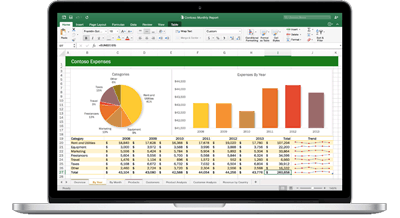
Microsoft Office 365 Excel for Mac improves interchangeability with Windows spreadsheets Excel for Mac 2011 includes improvements in the areas of information and visualization, speed, graphics editing, scripting, security, and collaboration. The innovative Sparklines feature provides an immediate graphical representation of Excel data via tiny charts that fit inside a spreadsheet cell next to the summarized data. Conditional Formatting has been improved to make it easier to format information with icon sets, data bars, and color scales. You can now sort and filter data by color and use multi- selection filters and convenient quick filtering options. Tables (before known as Lists) allow you to create multiple groups of associated information for easy editing and analysis.
Microsoft Excel for Mac 2011 PivotTables have enhanced speed and better compatibility with Windows editions of Excel. Improved editing capabilities and SmartArt graphics permit you to create professional-looking images/ without requiring outside photo-editing software. As with Word for Mac 2011, Visual Basic for Applications support has been resumed, enhancing compatibility with Office Excel for Windows and offering new capabilities including IntelliSense, watch windows, and a new Visual Basic debugging tool. You can control access to workbooks by using Information Rights Management (IRM) and collaborate on protected workbooks across operating systems. To enhance collaboration, Excel for Mac 2011 allows you to create platform-independent workbooks and exchange dates between workbooks without being required to distinguish between 1900 vs. 1904 date systems.
Excel for Mac 2008 supports the same number of spreadsheet cells as the Windows version of Excel and includes the Formula Builder for streamlining the creation of complex calculations. Excel for Mac 2008 also comes with an Elements Gallery with templates for popular tasks including payroll. Just like the 2008 edition of Microsoft Word for Mac, Microsoft Office Excel for Mac 2008 doesn't support Visual Basic for Applications. Progent's Mac consultants can assist you to determine whether this restriction justifies an upgrade to Office for Mac 2011.
Excel for Mac 2004 introduced a Layout View that permits you to read and manipulate in a window in WYSIWYG mode, conveniently scale content to fit the right page count, and insert headers and footers with a click. Charting improvements offer additional color combinations and allow you to use the Formatting Palette for instantly revising your chart class, data, fills, weights, and special effects. Smart Buttons enable you to track down and fix spreadsheet formula problems and manage how the AutoFill feature formats your content. Editing/function tools allow you to view the proper syntax for a library of functions, and to click and drag to alter ranges with the updated Range Finder. XML file support allows you to use Extensible Markup Language to collaborate on data.
- Microsoft PowerPoint for Mac
 Office 365 PowerPoint for Mac and PowerPoint for Mac 2016 include the new Theme Variants feature that makes it easy to alter the style of a presentation by switching the color scheme. As with new versions of Word for Mac, a new Threaded Comments feature promotes collaboration by showing complete conversations next to related content. Teamwork is also improved with strong coauthoring support. An enhanced Presenter View lets the speaker see the current and next slide, speaker notes, and a timer while showing the audience just the projection of the current slide. An improved Animation Pane simplifies creating and editing professional-looking animations, and an improved Conflict Resolution View shows alternative updates to assist you to decide which versions to keep.
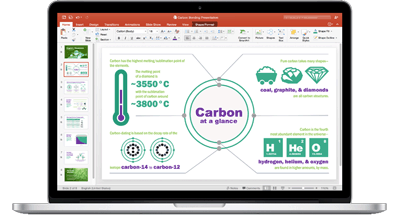
Office 365 PowerPoint for Mac makes it easier to design and deliver pro-quality presentations PowerPoint for Mac 2011 includes enhanced functionality in the areas of template management, picture touchup, movie support, transitions, layer and slide control, pacing, sharing, security, search, speed, and programmability. PowerPoint's Media Browser allows convenient access to a wide range of media libraries including iPhoto albums, iTunes playlists, and iMovie collections as well as Clip Art and other graphical content. The PowerPoint Presentation Gallery simplifies control of pre-built and custom templates as well as recently opened shows. Improved picture editing features include a background deletion function and powerful utilities for touchup, color, and cropping. You can also embed and format movies from within PowerPoint to make them a part of a show, making it easier to distribute and manage complex slide shows. You can easily add 3-D transitions and are provided with an expanded library of animation effects, extensible themes, improved chart tools, and additional SmartArt images with new sets of organization charts and picture diagrams.
Microsoft Office PowerPoint for Mac 2008 introduced Smart Art for quickly turning bulleted displays into a variety of flowcharts. The Object Palette utility organizes formatting controls for quick detailing. A slider makes it easy to alter the size of elements. An option for exporting to iPhoto enables you to watch slide shows with an Apple iPod or iPad. Microsoft PowerPoint for Mac 2008 also is compatible with an Apple Remote,
PowerPoint for Mac 2004 introduced Presenter functions that permit you to keep your presentation properly paced and let you make real-time adjustments by means of the controls displayed in the presenter's window. Custom animation and 3D transitions enable you to create more engaging presentations. A Format Font tool gives you increased control in specifying font characteristics including spacing, style, and opacity.
- Outlook for Mac and Entourage
 Microsoft Office 365 Outlook for Mac and Outlook for Mac 2016 include important new features such as support for push email to keep your inbox up to date, online archiving to conserve mailbox space, the ability to suggest a new meeting time in answer to a meeting request, and the ability to view multiple calendars concurrently. In addition, navigation has been simplified for moving between Mail, Calendar, People, Tasks, and Notes. Other improvements include the display of message threads in your inbox plus message preview to help you determine quickly how to handle new emails. With an Office 365 subscription, Full Screen Mode enables you to have multiple open messages or to operate two instances of Outlook in split-screen view.
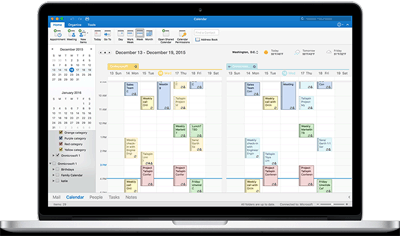
Office 365 Outlook for Mac supports side-by-side and overlay calendars to simplify scheduling Microsoft Outlook for Mac 2011 replaces Entourage and has been re-architected to provide significant enhancements in the areas of email creation and management, scheduling, backup and restoration, search, Windows compatibility, collaboration, performance, video conferencing, voice mail, mobility, IM, and presence. The Microsoft Outlook for Mac database for email, contact information, and calendars is now saved in separate text files, making them easier to manage. Microsoft Outlook for Mac is also Spotlight searchable and capable of being copied and recovered using Apple Time Machine. Configuring accounts has been simplified so you can easily add either Exchange-based accounts or accounts from major email services including Gmail, Hotmail, MobileMe, Yahoo!, Windows Live, and AOL.
Microsoft Office Outlook for Mac 2011 now automatically places your email, drafts, sent mail and erased messages for each of your mailboxes into unified folders so you no longer need to check individual email accounts and folders. The Conversations feature automatically groups associated messages to save time keeping track of email threads. The new Quick Look feature enables you to view file attachments that can include Microsoft Office or Acrobat PDF files, graphics, and videos. The Contacts Search panel enables you to search your contact data from any Outlook view by entering any element in any field.
To facilitate moving from Windows to Mac OS X, Microsoft Office Outlook for Mac 2011 now allows you to import Windows .PST files without the need of third-party utilities. For improved collaboration, Microsoft Office Outlook for Mac 2011 can stack shared calendars so you can quickly spot scheduling conflicts. You can also assign more than one category to a calendar event. In conjunction with Microsoft Exchange Server 2010, Office Outlook for Mac can transform voice mail into text messages and add them to your inbox to cut the time spent during the task of reviewing voice messages. New support offline address books gives users continual access to contact information. Running Microsoft Messenger for Mac 8 or Communications Server with Communicator for Mac 2011, you can see presence data in the new Contact Card and launch Instant Messaging, a video conference, or a voice call without leaving Office Outlook for Mac 2011.
Entourage 2008 features an Out of Office assistant that permits you to adapt out-of-office messages based on who receives it. In comparison with Entourage 2004, Microsoft Entourage 2008 provides improved filters against junk mail and phishing and provides To Do lists that can be read by means of the My Day utility, which enables you to view your day's events and To Do List on your Mac desktop. Microsoft Entourage 2008 also features tighter integration with Microsoft Exchange Server and offers more powerful scheduling functions. Progent's Entourage 2008 specialists and Microsoft Office Outlook for Mac consultants can assist you to enhance your Mac email system to work transparently with Exchange Server so that you can team up with fellow workers running Microsoft Outlook.
Entourage for Mac 2004 allows you to manage messages, contacts, schedules, and notes from a consolidated location. Microsoft Entourage 2004 can connect to email using IMAP protocol, POP, and WebDAV. Microsoft Entourage 2004 enables teamwork between Apple Macintosh and Windows clients by allowing workers to access their data on Exchange Server to handle messages, search Exchange's global address list, synchronize schedules and contacts, and schedule conferences. Progent can assist you to manage your Microsoft Entourage for Mac 2004 system or migrate smoothly to Office Outlook for Mac 2011.
Other Components of Microsoft Office for Mac 2011
Microsoft Office for Mac 2011 provides additional utilities to help you to create, manage, and distribute information productively. Other powerful Microsoft Office for Mac 2011 tools that Progent can assist you to configure and support include:
- Messenger for Mac 8 is included in Microsoft Office for Mac 2011 and is integrated into Office Word for Mac, Office PowerPoint, and Outlook for Mac to enable Instant Messaging, presence awareness, file sharing, and voice and video conferencing. Functions include the ability to transmit to any computing device set up with MSN Mobile; support for up to 15 people to take part in a conversation; IM and presence blocking determined by permitted, blocked, or unfamiliar status; the ability to exchange, view and comment on images and text; emoticon support; and custom display pictures. Messenger for Mac users must have a Windows Live ID account.
- Remote Desktop Connection, available with Office for Mac 2011 and intended for use with OS X Snow Leopard or Leopard, offers simultaneous connections to multiple remote Microsoft Windows-based PCs or to a remote network server to execute hosted applications and access files. With Remote Desktop Connection for Mac 2 you can print from within Windows programs to any Mac-accessible printer. A new desktop protocol improves performance and integration with Microsoft Windows 7 and an automatic reconnection feature restores a session if the network connection is interrupted. Network Level Authentication (NLA) enhances security by verifying users before establishing a full connection. To find out more about Remote Desktop Connection and about how Progent can assist you to set up and maintain a solution for driving Windows-based computers from Mac OS X, see Remote Desktop Connection for Mac 2 consulting.
- Office Web Apps are online companions to Microsoft Office for Mac Word, Excel, PowerPoint, and Outlook that enable you to use any standard web browser running on virtually any computing device to view, share, and edit documents and files held online on Microsoft Windows Live SkyDrive or on a SharePoint 2010 web site. This allows cross-platform collaboration and supports mobile workers. For business use, Web Apps should be run on SharePoint Foundation 2010. Security improvements for Office Web Apps 2011 include DEP support, Office file authentication to protect against fuzzing exploits, additional file block settings, and support for a protected-view sandbox environment. To learn how Progent's certified SharePoint experts can assist your business to set up and manage a SharePoint web site to work with Web Apps for Mac Word, Excel, PowerPoint, and Outlook for co-authoring from virtually any computer, visit Microsoft SharePoint consulting.
- Microsoft Lync for Mac replaces Communicator for Mac as the enterprise-class IM, rich presence, conferencing and voice client included with Microsoft Office for Mac 2011. Rich presence indicators can be determined by calendar data, login status, or specified by the user. Lync for Mac works in tandem with either Microsoft Lync Online or Lync Server 2010, which has replaced Office Communications Server and Microsoft Live Communications Server. Microsoft Lync allows users to ask contacts to participate conferences or start a meeting directly from Microsoft Outlook for Mac or Lync for Mac 2011. Advanced conferencing capabilities include desktop sharing and descriptive roster results. For more information about Microsoft Lync Server 2010's features and the consulting offered by Progent's Lync platform experts, see Lync Expertise.
How Progent's Experts Can Support Your Business with Office 365 for Mac
Progent's Microsoft-expert support professionals, Cisco-Premier network engineers, and macOS and OS X specialists can assist you to incorporate your Mac computers and software into a dependable and protected IT network, set up your Exchange Server to support the groupware features of Office 365 Outlook for Mac, and provide Mac Education for Microsoft Office for Mac Word, Excel, PowerPoint, and Outlook. Progent can also provide a broad array of Exchange consulting services including system planning and installation, troubleshooting, protection, remote access, performance optimization, fault tolerance, plus spam and Virus filtering and email encryption.
Get in Touch with Progent to Find Office for Mac Expertise
If you are trying to find Mac technology support professional, phone Progent at